













How to Set the Right Gaming Chair Height for Your Desk and Monitor

How high should your chair be for gaming? For most people, the ideal gaming chair seat height falls between 16 and 21 inches from the floor. However, the correct chair height is not one fixed number. It depends on your leg length, desk height, monitor height, and the position of your keyboard and mouse.
The perfect height allows you to keep your feet flat on the floor, your knees close to a 90-degree angle, and your hips level with or slightly above your knees. Your elbows should rest comfortably beside the desk while your shoulders remain relaxed.
When the gaming chair, standing desk, and monitor work together, the setup can improve posture, reduce neck and back discomfort, and make long gaming sessions feel more natural.
Start With Your Feet and Knees
Sit fully back in the seat instead of leaning on the front edge of the chair. Adjust the chair height until both feet rest comfortably and remain flat on the floor.
Your thighs should be approximately parallel to the floor. Your knees should form an angle close to 90 degrees, while your lower legs fall naturally beneath them. This position helps distribute body weight across the seat rather than placing unnecessary pressure behind the knees.
To determine a useful starting height, measure the distance from the floor to the back of your knee. This measurement gives you an idea of which seat height may suit your body and leg length.
A taller person will normally need to raise the chair. A shorter person may need to lower the chair or add a footrest. If the correct height for the desk leaves your feet hanging, use a stable footrest rather than letting your legs remain unsupported.
Seat depth also makes a difference. Ideally, there should be a gap of two or three fingers between the seat edge and the back of your knees. A seat that is too deep can increase pressure under the legs. A shallow seat may not support enough of the thighs.
Match Chair Height to Desk Height
Desk height directly affects the optimal chair position. A typical fixed table or desk is around 72 cm high, but this measurement will not suit every person.
Move the chair close to the gaming desk and place your hands on the keyboard and mouse. Keep your elbows close to your body. Your forearms should be parallel to the floor or angled slightly downward toward the desk surface.
If the desk surface makes you lift your shoulders, the chair is probably too low. Raise the chair slightly and check whether your feet still stay flat. If your arms must reach downward or your wrists bend toward the desk, the chair may be too high.
The same principle applies when adjusting an office chair for office work. Whether you use a gaming chair, ergonomic chair, or traditional office chair, the desk should meet your elbows without forcing your shoulders upward.
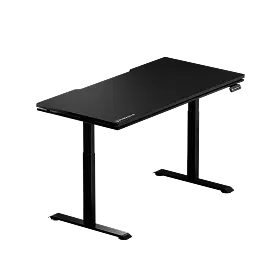
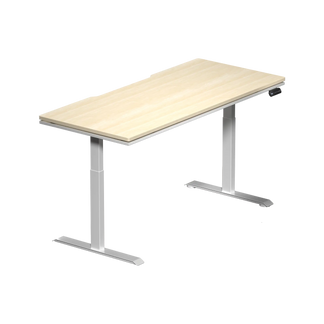
A height-adjustable desk makes this easier by allowing you to set the desk height to suit your body and preferred sitting position. The Blacklyte Atlas sit-to-stand desk collection offers flexible height adjustment for both sitting and standing, so you can adapt the desk to your posture rather than adjusting your body to a fixed-height surface.
Set the Correct Armrest Height
Armrest height affects your shoulders, neck, arms, and wrists. The armrests should support your forearms without lifting your shoulders.
Adjust the armrests until your elbows rest comfortably at approximately a 90-degree angle. Your arms should remain close to your sides, and your wrists should stay straight while gaming or completing office work.
Armrests that are too high can lead to shoulder and neck tension. Armrests that are too low may force the muscles in your upper back to support the weight of your arms for extended periods.
The armrests should also allow the chair to move close to the desk. If they strike the desk surface, lower them or move them inward.
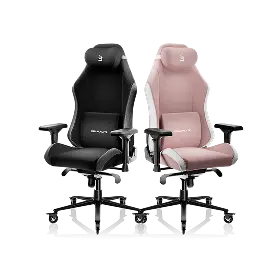
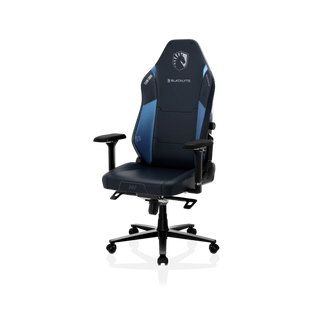
The Blacklyte Athena Pro Gaming Chair includes adjustable 4D armrests, seat height adjustment, and adjustable lumbar support. These features make it easier to align the chair with different desk heights, body types, and gaming setup layouts.
Align Monitor Height With Chair Height
Once the correct chair height and desk height are established, adjust the monitor. Do not ruin a comfortable sitting position just to view a screen that is too high or too low.
The top of the monitor should be at eye level or slightly below eye level. Your eyes should naturally fall toward the middle of the screen without making you raise your chin or lean forward.
A monitor placed too high can create tension in the neck and shoulders. A low screen can lead to forward-head posture, rounded shoulders, and lower back pain because the body moves away from the backrest and lumbar support.
Monitor distance matters as well. Position the screen far enough away that you can read it clearly without leaning forward. The best distance will depend on monitor size, resolution, and personal vision.
A height-adjustable monitor arm can help you reach the correct monitor height without changing the chair or desk. The Blacklyte Atlas Single Monitor Arm allows the screen to be raised, lowered, or moved while keeping more of the desk surface available.
Adjust the Backrest and Lumbar Support
Proper chair height improves posture, but the backrest must also support the lumbar region. Adjust the lumbar support so it fits the natural inward curve of your lower spine.
The support should feel present without pushing your body away from the backrest. Too much pressure can become uncomfortable, while too little support may allow the lower back to collapse into a rounded position.
A backrest angle between 90 and 120 degrees can support the lumbar region during gaming sessions. A more upright position may suit keyboard and mouse play. A slightly reclined position may be more comfortable for controller gaming, watching content, or resting between matches.
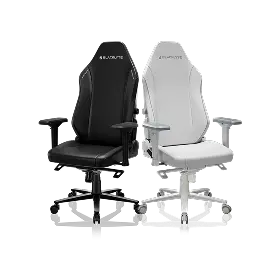
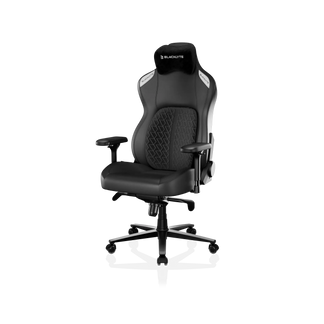
The Blacklyte Kraken Pro Gaming Chair offers adjustable support for users who move between sitting positions. It is designed for gaming, office work, and extended periods at the desk, helping one chair suit different parts of the day.
Check Your Complete Gaming Setup
| Setup area | Optimal position | Sign of a poor fit |
| Feet | Feet flat on the floor or footrest | Feet hang or fall behind the chair |
| Knees | Close to a 90-degree angle | Knees sit far above or below the hips |
| Hips | Level with or slightly above knees | Body weight shifts toward the seat edge |
| Seat depth | Two-to-three-finger gap | Pressure builds behind the knees |
| Elbows | Around 90 degrees | Shoulders lift, or arms reach forward |
| Forearms | Parallel to the desk surface | Wrists bend sharply |
| Monitor | Top of screen near eye level | Neck tilts upward or forward |
| Lumbar support | Follows the lower-back curve | The spine loses support |
Remember to Change Positions
Even the perfect height cannot remove every problem associated with prolonged sitting. Staying in one position for extended periods can lead to stiff muscles, poor circulation, pain, and other health problems.
Change your sitting posture frequently during gaming sessions. Stand between matches, move your legs, adjust the backrest, or switch to a standing desk position when practical. The idea is not to find one position and hold it all day. The goal is to create a setup that supports movement.
Correct chair height can promote better circulation in the legs, improve overall comfort, and reduce unnecessary pressure on the neck and back. It may also help you stay focused because you are not constantly distracted by discomfort.
The right chair height begins at the floor. Keep your feet flat, align your knees and hips, match the chair to the desk height, adjust the armrests, and then set the monitor at eye level.
Whether you use a gaming chair, ergonomic chair, or office chair, these adjustments can make a noticeable difference in comfort and posture. A well-adjusted chair will also help you get more value, support, and durability from your gaming setup in the long run.
This article provides general ergonomic guidance and is not medical advice. Persistent neck, wrist, leg, or back pain should be discussed with a qualified healthcare professional.


