

Passer au contenu
Quelle chaise vous convient?
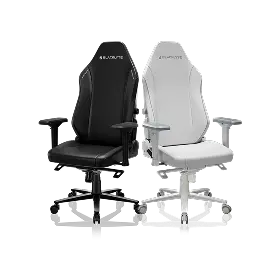
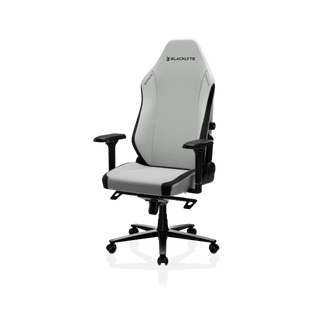
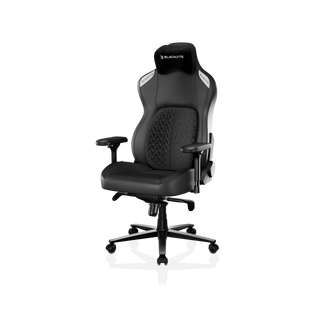
Chaise de jeu Athena Pro
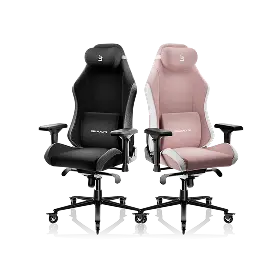
Chaise de jeu Kraken Pro
Athéna Pro
KrakenPro
Our premium chair experience, with upgraded dual-layer memory foam
Our flagship chair experience, redefining support, comfort, and craftsmanship.
Depuis €419 €469
Depuis €499 €599
Caractéristiques principales
Options de revêtement
Tissu Blacklyte FlexKnit™
Revêtement tissé haut de gamme. Fibres haute résistance pour une grande durabilité face à l'abrasion, un confort respirant et un toucher texturé raffiné.
Simili-cuir Blacklyte DuraGen™
Cuir PU éco-certifié nouvelle génération. Ignifuge, résistant à l'hydrolyse et aux UV, offrant une durabilité remarquable.
Similicuir Blacklyte DuraGen™
Cuir PU éco-certifié de nouvelle génération. Ignifuge, résistant à l'hydrolyse et au vieillissement UV, avec une durabilité accrue.
Appui-tête
Double appui-tête magnétique
Coussin de tête incurvé à double aimant
Soutien lombaire
Soutien lombaire intégré ajustable 4 directions
Système de support lombaire à air dynamique
Support lombaire dynamique qui flotte et se verrouille en position, s'adaptant sans effort à votre posture.
Coussin d'assise
Mousse à mémoire de forme double couche optimisée
Mousse à mémoire de forme haute densité
Fermeté
Moyennement ferme avec accueil moelleux double couche
Moyennement ferme
Accoudoirs
Accoudoirs 4D optimisés avec un toucher plus doux (Édition renforcée)
Accoudoirs 4D standard
Disponibilité
Taille
Standard
Taille unique s'adaptant à la plupart des morphologies
Standard
Taille unique s'adaptant à la plupart des morphologies
Coloris
Cuir
Noir, Blanc, Bleu, Rouge Bordeaux
Tissu
Noir, Craie, Camouflage
Noir
Spécifications techniques
Base à roulettes
Alliage d'aluminium
Alliage d'aluminium
Inclinaison
90–149°
90-149°
Mode basculement
0–14°
0-14°
Roulettes
Roulettes silencieuses en PU de 50 mm
Ultra-silencieuses et respectueuses des sols
Roulettes silencieuses en PU de 50 mm
Ultra-silencieuses et respectueuses des sols
Vérin à gaz
Classe 4
Vérin à gaz KGS (avec amortisseur)
Classe 4
Vérin à gaz KGS (avec amortissement)
Mécanisme d'inclinaison
Mécanisme basculant Frog
Mécanisme ergonomique Frog
Garantie
Garantie de 3 ans
extensible jusqu'à 5 ans
Garantie 3 ans
extensible jusqu'à 5 ans
Our premium chair experience, with upgraded dual-layer memory foam
Our flagship chair experience, redefining support, comfort, and craftsmanship.
Chaise de jeu Athena Pro
Chaise de jeu Kraken Pro
Depuis €419 €469
Depuis €499 €599
Vue réduite
Afficher uniquement les différences
Caractéristiques principales
Options de revêtement
Tissu Blacklyte FlexKnit™
Revêtement tissé haut de gamme. Fibres haute résistance pour une grande durabilité face à l'abrasion, un confort respirant et un toucher texturé raffiné.
Simili-cuir Blacklyte DuraGen™
Cuir PU éco-certifié nouvelle génération. Ignifuge, résistant à l'hydrolyse et aux UV, offrant une durabilité remarquable.
Similicuir Blacklyte DuraGen™
Cuir PU éco-certifié de nouvelle génération. Ignifuge, résistant à l'hydrolyse et au vieillissement UV, avec une durabilité accrue.
Appui-tête
Double appui-tête magnétique
Coussin de tête incurvé à double aimant
Soutien lombaire
Soutien lombaire intégré ajustable 4 directions
Système de support lombaire à air dynamique
Support lombaire dynamique qui flotte et se verrouille en position, s'adaptant sans effort à votre posture.
Coussin d'assise
Mousse à mémoire de forme double couche optimisée
Mousse à mémoire de forme haute densité
Fermeté
Moyennement ferme avec accueil moelleux double couche
Moyennement ferme
Accoudoirs
Accoudoirs 4D optimisés avec un toucher plus doux (Édition renforcée)
Accoudoirs 4D standard
Disponibilité
Taille
Standard
Taille unique s'adaptant à la plupart des morphologies
Standard
Taille unique s'adaptant à la plupart des morphologies
Coloris
Cuir
Noir, Blanc, Bleu, Rouge Bordeaux
Tissu
Noir, Craie, Camouflage
Noir
Spécifications techniques
Base à roulettes
Alliage d'aluminium
Alliage d'aluminium
Inclinaison
90–149°
90-149°
Mode basculement
0–14°
0-14°
Roulettes
Roulettes silencieuses en PU de 50 mm
Ultra-silencieuses et respectueuses des sols
Roulettes silencieuses en PU de 50 mm
Ultra-silencieuses et respectueuses des sols
Vérin à gaz
Classe 4
Vérin à gaz KGS (avec amortisseur)
Classe 4
Vérin à gaz KGS (avec amortissement)
Mécanisme d'inclinaison
Mécanisme basculant Frog
Mécanisme ergonomique Frog
Garantie
Garantie de 3 ans
extensible jusqu'à 5 ans
Garantie 3 ans
extensible jusqu'à 5 ans
Quel bureau est fait pour vous ?
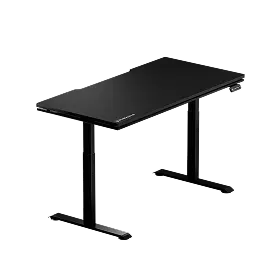
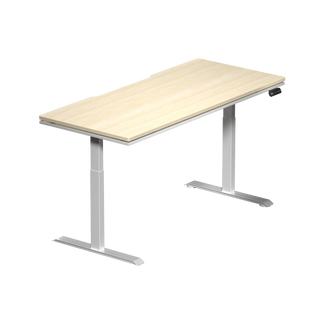
Bureau debout Atlas Lite
Bureau Atlas
Bureau debout Atlas Lite
Bureau Atlas
Notre bureau assis-debout de nouvelle génération, disponible en quatre tailles et trois coloris.
Notre bureau réglable en hauteur de première génération avec éclairage dynamique synchronisé à votre configuration
Depuis €649 €699
Depuis €1.119 €1.199
Caractéristiques principales
Colonne d'alimentation intégrée
Plateau de gestion des câbles intégré
Surface magnétique
100%
Compatibilité avec les accessoires modulaires de bureau
Partiellement compatible
Plage de hauteur
700 mm–1 170 mm
(27,6″–46,1″)
720 mm–1 370 mm
(28,3″–53,9″)
Contrôle de l'éclairage
Préréglages de hauteur mémorisables
4
2
Disponibilité
Taille
Petit
1 200 mm × 800 mm
(47,2″ × 31,5″)
Moyen
1 400 mm × 800 mm
(55,1″ × 31,5″)
Grand
1 600 mm × 800 mm
(63,0″ × 31,5″)
Très grand
1 800 mm × 800 mm
(70,9″ × 31,5″)
Grand
1 500 mm × 700 mm
(59,1″ × 27,6″)
Coloris
Noir Obsidienne, Blanc Pierre de Lune, Chêne Naturel
Noir uniquement
Spécifications techniques
Conception du plateau de bureau
(Extérieur) Stratifié mélaminé
(Intérieur) MDF
(Extérieur) Revêtement PVC
(Intérieur) MDF avec acier
Moteurs
Double moteur électrique
Colonnes des pieds
Pieds à 2 segments
Pieds à 3 segments
Système anti-collision
Stabilité renforcée
Interrupteur d'alimentation
Vitesse du moteur (élévation verticale)
25 mm/s (1″/s)
38 mm/s (1,5″/s)
Niveau sonore
≤48 dB
<48 dB
Capacité maximale de charge distribuée
120 kg (265 lbs)
125 kg (275,6 lbs)
Charge maximale de puissance de sortie
100–240 V
100–240 V
Certifications
Garantie
3 ans
3 ans
Notre bureau assis-debout de nouvelle génération, disponible en quatre tailles et trois coloris.
Notre bureau réglable en hauteur de première génération avec éclairage dynamique synchronisé à votre configuration
Bureau debout Atlas Lite
Bureau Atlas
Depuis €649 €699
Depuis €1.119 €1.199
Vue réduite
Afficher uniquement les différences
Caractéristiques principales
Colonne d'alimentation intégrée
Plateau de gestion des câbles intégré
Surface magnétique
100%
Compatibilité avec les accessoires modulaires de bureau
Partiellement compatible
Plage de hauteur
700 mm–1 170 mm
(27,6″–46,1″)
720 mm–1 370 mm
(28,3″–53,9″)
Contrôle de l'éclairage
Préréglages de hauteur mémorisables
4
2
Disponibilité
Taille
Petit
1 200 mm × 800 mm
(47,2″ × 31,5″)
Moyen
1 400 mm × 800 mm
(55,1″ × 31,5″)
Grand
1 600 mm × 800 mm
(63,0″ × 31,5″)
Très grand
1 800 mm × 800 mm
(70,9″ × 31,5″)
Grand
1 500 mm × 700 mm
(59,1″ × 27,6″)
Coloris
Noir Obsidienne, Blanc Pierre de Lune, Chêne Naturel
Noir uniquement
Spécifications techniques
Conception du plateau de bureau
(Extérieur) Stratifié mélaminé
(Intérieur) MDF
(Extérieur) Revêtement PVC
(Intérieur) MDF avec acier
Moteurs
Double moteur électrique
Colonnes des pieds
Pieds à 2 segments
Pieds à 3 segments
Système anti-collision
Stabilité renforcée
Interrupteur d'alimentation
Vitesse du moteur (élévation verticale)
25 mm/s (1″/s)
38 mm/s (1,5″/s)
Niveau sonore
≤48 dB
<48 dB
Capacité maximale de charge distribuée
120 kg (265 lbs)
125 kg (275,6 lbs)
Charge maximale de puissance de sortie
100–240 V
100–240 V
Certifications
Garantie
3 ans
3 ans

Single vs Dual Monitor Mount: Which Should You Choose?

par Blacklyte

single vs dual monitor mount

If you’re looking for the best monitor mount for your desk, you’re not alone — many people face the same dilemma when upgrading their workspace. Should you go with a single monitor arm desk mount or a dual monitor arm desk mount? Once your monitor is lifted off its bulky factory stand and placed on a stable, adjustable mount, the difference is immediately obvious: more space, cleaner lines, and a setup that actually feels comfortable to work at. The real question isn’t whether you need a monitor arm mount — it’s which type fits the way you actually work.

Benefits of a Single Monitor Mount

A single monitor mount does exactly what it sounds like — it supports one screen and lets you move it into a comfortable position. For many people, a single monitor desk mount is already a huge upgrade over a fixed stand.

Blacklyte atlas single monitor mount

In real-world use, a single monitor mount works best when:

  • Your desk space is limited
  • You prefer a clean and minimal layout
  • You mostly focus on one main task or application
  • You want something easy to install and adjust

It also tends to be lighter, cheaper, and quicker to set up, which makes it a popular choice for students, writers, casual gamers, and anyone working from a laptop plus one external monitor. That said, there is an obvious limitation — if your workflow regularly jumps between apps or documents, one screen can start to feel cramped pretty quickly.

Benefits of a Dual Monitor Mount

A dual monitor mount is a different story. If you're selecting a dual monitor arm, understanding how it improves multitasking and workflow is especially important. Instead of trying to fit everything into one display, with a dual monitor desk mount, you get two separate screens you can position independently.

Blacklyte atlas dual monitor mount

People who benefit the most from this setup usually fall into one of these groups:

  • Programmers switching between code and preview
  • Designers and video editors working across tools and timelines
  • Analysts, traders, and spreadsheet-heavy roles
  • Remote workers juggling communication and project windows
  • Streamers who need a secondary screen for chat or monitoring

The big advantage is simple: less tab-switching, more visible workspace.
The trade-offs?

  • Higher cost
  • Heavier and more demanding on desk stability
  • Slightly more effort during installation

But for users who genuinely multitask, the improvement in workflow tends to outweigh the downsides very quickly.

Types of Monitor Mounts: Single vs Dual Comparison

If you're selecting a monitor arm but aren’t sure which type makes the most sense, the comparison below makes the decision much easier.

Factor Single monitor mount Dual monitor mount
Number of screens 1 2
Desk space use Compact & minimal Requires more space
Productivity level Basic to moderate High productivity & multitasking
Installation Simple Moderate
Cost Lower Higher
Adjustability Flexible Highly flexible (two screens)
Best for Minimalists, casual users, students Professionals, creators, multitaskers


Ergonomics — Posture, Eye Level, and Comfort

Ergonomically, both single and dual monitor mounts can be ergonomic monitor mounts when positioned correctly. The difference really comes down to how you set them up in real life, not just what the specs say. A good adjustable monitor mount simply gives you the flexibility to dial things in until they feel natural. 

Here’s what tends to work best in everyday use:

  • Place your main screen directly in front of you so you’re not twisting your body to look at it.
  • Adjust the height so that you’re roughly looking at the top third of the display — this keeps your neck in a relaxed position instead of constantly looking down.
  • Try to sit about 20–28 inches (50–70 cm) away from the screen — basically around an arm’s length. If you find yourself leaning in, you’re probably too far back.
  • With two monitors, aim to keep your neck rotation within about 30 degrees when glancing between screens. If you have to turn your head dramatically, the layout likely needs tweaking.

Dual setups are where positioning really matters. If one screen sits much higher or farther away than the other, you’ll start to feel it in your neck pretty quickly. But when both monitors are aligned at similar height and distance, a dual setup can feel just as comfortable as a single screen, while giving you the bonus of extra workspace.

Productivity & Workflow: Who Benefits More From Each Setup?

Dual monitor mounts are better for:

  • Programmers writing code while previewing output
  • Designers and video editors using timeline tools
  • Office users comparing documents or spreadsheets
  • Streamers or content creators monitoring chat and overlays
  • Traders and analysts watching multiple dashboards

More screen space means fewer window switches and more focus.

Single monitor mounts are better for:

  • Minimalist work environments
  • Small desks or compact rooms
  • Gaming-focused setups with one primary display
  • Users who value simplicity over multitasking

If your workflow revolves around one main task at a time, a single monitor mount keeps things clean and efficient.

Desk Space, Layout, and Room Size Considerations

Before choosing, consider how much space your desk and room actually provide:

  • Small desks or narrow tables → single monitor mount is usually more practical
  • Large desks or corner setups → dual monitor mounts fit comfortably
  • Limited wall clearance or shallow depth may restrict dual-arm positioning
  • Clamp or grommet mounting may also influence your decision

If you’re using an ultrawide display, you may even find that one large monitor on a single arm replaces the need for two separate screens.

Budget & Value: Which Option Offers Better Return?

A single monitor mount is more budget-friendly and delivers excellent value for:

  • New setups
  • Students
  • Compact home offices

A dual monitor mount costs more upfront, but the investment pays off if:

  • You multitask daily
  • Your work depends on speed and workflow efficiency
  • Screen space directly impacts your productivity

Think of it less as a gadget and more as a productivity tool.

Monitor Mount Stability, Weight Capacity & Compatibility

Not all monitor desk mounts are built the same. When comparing options, check:

  • Maximum weight capacity per mount
  • Supported monitor size
  • Whether the mount arm uses a gas-spring mechanism or mechanical joints
  • Compatibility with ultrawide or curved monitors

Dual arm mounts may place more pressure on the desk mount, so a solid desk surface and high-quality arm mount are important for long-term stability.

When Should You Upgrade From a Single Mount to a Dual Mount?

You may be ready to switch if:

  • Your workload has grown beyond a single screen
  • You’ve moved into remote work or hybrid office mode
  • You frequently multitask between tools, charts, or editing panels
  • You want a smoother and more efficient daily workflow

Many users start with one monitor — then upgrade when productivity demands increase. If this sounds like you, upgrading to a Blacklyte dual monitor mount is a practical next step.

Final Recommendation: Which One Should You Choose?

Whether you choose a single or dual monitor mount, upgrading to a proper arm is already a win for your desk, posture, and workflow. If you’re unsure which path to take, a Blacklyte dual monitor mount is a reliable way to future-proof your setup — giving you more screen space when you need it, a cleaner desk when you don’t, and the build quality to support your work for years to come.

Share article
Recommended Products View All Products >
Bras pour double écran Atlas Bras pour double écran Atlas
€50 éteint
Bras pour double écran Atlas
White
€159
€209
Shop now
Bras pour moniteur Atlas Bras pour moniteur Atlas
€30 éteint
Bras pour moniteur Atlas
Black
€99
€129
Shop now

Merci de vous être abonné !

Cet email a été enregistré !

Achetez le look
Choisissez les options
this is just a warning
Connexion
Votre panier