












How to Stop Neck Pain When Using a Gaming Chair and Monitor

Most people assume neck pain comes from playing too long. That sounds logical, but in reality, the problem often starts much earlier — sometimes within the first 20 minutes. You just don’t notice it yet.
What usually happens is simple. You sit down, the chair feels comfortable, the game starts, and your body slowly shifts into a position that feels “normal” but isn’t actually relaxed. Your head moves slightly forward, your shoulders tighten a bit, and the tension stays there the entire session.
Nothing feels wrong at first. An hour later, your neck disagrees. What’s actually happening is simple from an ergonomic point of view. When your head moves slightly forward, the neck muscles have to support more weight than they’re designed to hold for long periods. Even a small forward tilt can create tension much faster than most gamers expect.
Why Neck Pain Happens When Using a Gaming Chair and Monitor
People often try to fix neck pain by changing only one thing. A new chair. A new neck pillow. A different sitting posture. Sometimes that helps, sometimes it doesn’t. The real issue is usually the combination of the chair and the monitor.
If the monitor is slightly too low, your head tilts forward. If the backrest is too upright, your upper back doesn’t really relax. If the neck pillow sits a little too high, it pushes your head forward instead of supporting it. None of these problems feels serious on its own. Together, they create constant tension. That’s why neck pain during gaming feels so confusing. The setup looks fine, but it doesn’t feel fine after a while.
How Monitor Height Can Cause Neck Pain During Gaming
Monitor height is one of the most common reasons neck pain shows up during gaming. Not because it’s completely wrong — usually it’s just slightly off. A simple solution is to adjust your monitor height using a flexible mount. A Blacklyte monitor arm lets you position your screen at the perfect eye level. This helps maintain a neutral neck position during long sessions.
For comfortable long sessions, the goal isn’t “perfect posture.” The goal is a neutral neck position — where your head stays balanced instead of leaning forward or tilting down toward the screen. When the monitor sits just a little too low, that neutral position disappears without you noticing it.
When the screen is a bit too low, you don’t notice yourself looking down. It feels natural. But your neck muscles stay slightly tense the entire time. After an hour, that “slightly tense” feeling becomes stiffness.
A lot of gamers try to fix this by sitting more upright. Ironically, that can make it worse. Sitting perfectly straight often forces your neck to hold your head up instead of letting the chair support it. What works better is surprisingly simple: lean back slightly and raise the screen just a little. That alone fixes the problem for a lot of people.
Why Some Gaming Chairs Fail to Support Your Neck
Comfort and support are not the same thing. A chair can feel soft and still not support your upper back properly. To understand which chairs truly help with spinal support and reduce back strain, see Does a Gaming Chair Really Help With Back Pain.
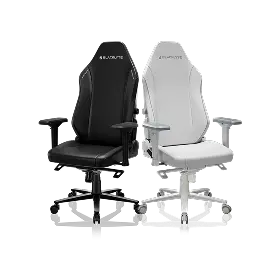
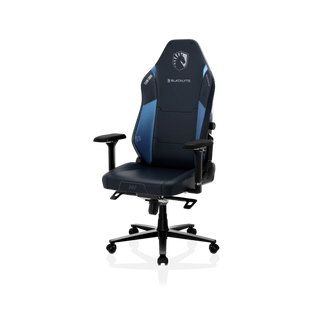
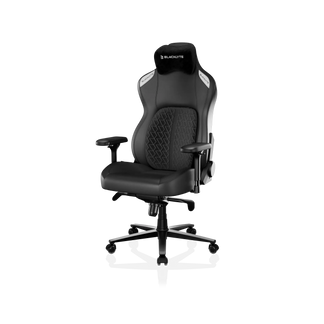
Meanwhile, not all gaming chairs, like Blacklyte gaming chairs, are designed to keep your spine aligned and your neck relaxed, even during extended gaming. When that happens, your neck ends up doing more work than it should. Proper upper-back support helps keep the spine aligned naturally. When that support isn’t there, the neck ends up compensating to keep your head in position. That’s why some chairs feel comfortable at first but still cause neck tension during longer sessions.

You can usually notice this within half an hour. If your shoulders start feeling tight first and your neck follows after, the upper-back support isn’t really doing its job. This doesn’t mean the chair is “bad.” It just means the way it’s adjusted — or the way the monitor is placed — is forcing your neck to compensate.
Simple Adjustments to Stop Neck Pain in Gaming
Most people assume they need a completely new setup. In reality, the solution is often just a few small adjustments that work together.
Try lowering the neck pillow slightly instead of raising it. Try leaning back a little more than you normally would. Try moving the monitor just a bit higher than where it feels comfortable at first. Small adjustments like these help your shoulders relax first. Once the shoulders stop holding tension, the neck usually relaxes naturally as well. That’s why minor setup changes often work better than trying to “sit straighter.”
Then stay in that position for ten minutes without adjusting anything. If your shoulders feel more relaxed instead of tighter, you’ve probably found the right direction. It’s not about sitting perfectly straight. It’s about sitting in a way that doesn’t force your neck to stay tense.
How to Relieve Neck Pain During Gaming Sessions
Once the tension starts, most people try to ignore it and keep playing. That usually makes it worse. What helps more is changing the position slightly before the pain gets stronger.
Leaning back a little more often works better than sitting up straighter. Raising the screen slightly also helps more than lowering the chair. Small changes matter more than big ones here. And short breaks actually work. Even standing up for half a minute is sometimes enough to reset the tension in your neck.
When Your Gaming Chair Is Causing Neck Pain
Sometimes the setup isn’t the issue. If you constantly feel like you need to lean forward to stay comfortable, or if your upper back never really feels supported, the chair itself may not be designed for long sessions.
A chair that supports the upper back properly usually makes the neck feel relaxed almost immediately. If that never happens no matter how you adjust it, the chair is probably the reason the tension keeps coming back. Switching to a well-designed option like the Blacklyte Gaming Chair can make long sessions noticeably more comfortable.
FAQ: Neck Pain From Gaming Chair and Monitor
1. Why does my neck hurt even when using a gaming chair properly?
Most neck pain while gaming comes from monitor height or sitting too close, not the chair itself. Try adjusting your monitor so the top of the screen is at eye level and sit at a comfortable distance (about an arm’s length away) to reduce tension.
2. Should my monitor be at eye level to prevent neck pain?
Yes. Looking down constantly puts pressure on your neck. The top of your screen should be roughly at eye level, so your head stays in a neutral, relaxed position.
3. How should a neck pillow be positioned for gaming comfort?
A neck pillow should support the natural curve of your neck without pushing your head forward. If your chin feels pushed down, the pillow is too high—lower it until your head rests comfortably while your upper back is fully supported.
4. Can a gaming chair cause neck pain if not adjusted properly?
Yes, a gaming chair can contribute to neck pain if the backrest angle or support isn’t set correctly. Most of the time, however, neck pain comes from the overall setup.
5. What’s the fastest way to relieve neck pain during gaming sessions?
Try raising your monitor slightly and leaning back a little instead of sitting perfectly straight. Take short breaks every 20–30 minutes to stretch your neck and shoulders.
Final Thoughts
Neck pain while gaming is extremely common, but it rarely comes from playing too long. Most of the time, it comes from small setup details that don’t seem important until they start affecting your neck.
Once the chair supports your upper back and the monitor sits at the right height, long sessions usually feel completely different. You don’t need a perfect posture. You just need a setup that allows your neck to stay relaxed without thinking about it — and not every gaming chair, like Blacklyte, is actually designed to provide that kind of upper-back support.


