















Gaming Computer Desks: What Separates a Real One From a Repainted Office Desk
Walk into any furniture store or scroll through any major retailer and you'll notice the same division: desks with angular silhouettes, RGB strips, and names that sound like military operations on one side, and clean-lined, neutral-toned "office" desks on the other. The assumption baked into that division is that the gaming label means something — that these products were engineered differently, not just reskinned.
Sometimes that assumption is correct. Often, it isn't. A significant portion of what's sold as a gaming computer desk is a standard MDF office surface with a carbon-fiber-texture wrap, a cable grommet punched through the top, and a price premium attached to the branding. Knowing the difference isn't a matter of cynicism — it's the difference between a desk that holds up to a real setup and one that wobbles under load, creaks when you rest your arms, and creates a cable nightmare within months.
This guide breaks down the five structural and ergonomic factors that actually separate a purpose-built gaming computer desk from a repainted office product — and gives you a clear framework for deciding what your setup actually needs.
The Label Problem: Marketing vs. Engineering
The term "gaming desk" is not a protected category. Any manufacturer can apply it to any product. That matters because the cues shoppers typically use to identify gaming desks — RGB lighting, aggressive color schemes, angular legs — are purely aesthetic and tell you nothing about structural performance. A desk can have reactive lighting and a carbon-fiber finish while being built on the same particle-board substrate and thin-gauge steel frame as an entry-level office desk, and a premium office desk can have the rigidity, surface area, and cable routing a serious gamer actually needs.
The meaningful distinction isn't gaming versus office. It's whether a desk was engineered with the demands of a multi-monitor, multi-peripheral, multi-hour setup in mind. That engineering shows up in five specific places — and you can evaluate every one of them before you buy.
Factor 1: Surface Area Engineered for Multi-Monitor Setups
A standard office desk is sized around a laptop, a notepad, and maybe a single monitor. Typical widths run 39 to 47 inches — workable for a productivity workstation, but immediately constraining the moment you add a second display. A dual-monitor gaming setup needs a minimum of 47 to 55 inches of width to position both screens at comfortable viewing angles without crowding peripherals to the edge. A single ultrawide panel requires similar depth clearance to sit at the correct focal distance. Gaming desks reliably offer 55 to 71 inches of width as a standard range, with L-shaped configurations extending usable surface further for streaming rigs, secondary PCs, or dedicated capture stations.
Depth matters as much as width, though it's discussed far less. Most standard desks run 19 to 24 inches deep — sufficient for a monitor on a stand but not for achieving the recommended 50 to 70 centimeter viewing distance to a 27-inch panel without the monitor overhanging the back edge. Purpose-built gaming desks tend to run deeper, which directly affects eye-to-screen distance, neck posture, and long-session fatigue. If your current desk forces your monitors forward because the surface isn't deep enough to push them back, that's a structural constraint affecting ergonomics, not just aesthetics.
Factor 2: Frame Construction and Real Load Capacity
Load capacity ratings are listed on virtually every desk, but they rarely tell the full story. The number on the box reflects static load — the total weight the desk can hold when everything is perfectly still. Gaming isn't static. Every mouse sweep, forward lean, or enthusiastic reaction applies dynamic load, momentarily exceeding the stable limit and creating the flex and wobble that stresses joints over time. A desk rated at 100 lbs that flexes when you rest both arms on the edge is already being pushed to its structural limits under normal use — before you account for a mid-tower PC, two monitors, monitor arms, speakers, and peripherals.
A full dual-monitor battlestation commonly totals 60 to 100 lbs of equipment, which means a desk rated at 100 to 120 lbs has almost no safety margin under real gaming conditions. Serious gaming desks are engineered with reinforced frames, heavier-gauge steel leg columns, and cross-bracing that provides lateral stability under dynamic load — not just static holding capacity. The visual test is simple: press both palms flat on the desk surface and push forward. Any flex is a warning sign. Any audible creak means the joints are already under stress.
Surface material also contributes to structural performance. The most common desktop substrate is MDF (medium-density fiberboard), which offers a flat, consistent surface that takes laminate finishes well and resists warping better than particle board. However, on spans over 60 inches, MDF benefits significantly from steel under-rails or center brackets to prevent sag under sustained load. A desk that looks solid at purchase but develops a slight bow at the center after six months of use is an MDF panel without adequate under-frame support — a construction shortcut that's common at the lower end of the gaming desk market regardless of branding.
Factor 3: Integrated Cable Management (Not an Afterthought)
Cable management is consistently the most underrated differentiator between gaming desks and repainted office products. The gap is functional, not cosmetic. A setup running a desktop PC, dual monitors, external audio, a keyboard, and a mouse generates a significant cable volume. Without routing infrastructure, those cables hang freely behind and beneath the desk, creating tension on ports, snagging on chair wheels, and creating a tangle that becomes progressively harder to service.
Purpose-built gaming desks include at minimum a cable grommet hole and an under-desk cable tray. Better implementations route cables through the desk structure itself, providing dedicated channels that keep power bricks, display cables, and peripheral runs separated and secured. This matters more on a standing desk than a fixed desk, because any cable that isn't properly routed will stretch, snag, or disconnect during height transitions. An under-desk cable tray designed to travel with the desk frame is a non-negotiable feature if you're running a sit-stand setup with full peripheral connectivity. Most regular office desks include neither a grommet nor a tray — and adding aftermarket solutions is a workaround, not a substitute for integrated design.
Factor 4: Surface Material and Desk-Edge Ergonomics
The surface a gaming desk provides matters beyond the obvious scratch resistance and durability considerations. Mouse tracking performance is directly affected by desk surface texture — a rough or heavily patterned laminate creates inconsistent resistance, while a smoother surface provides more predictable glide. Many gaming desks are designed with a full-surface mouse pad compatibility in mind, meaning the texture and edge treatment across the entire top is engineered to work with large-format desk pads rather than just a small mouse pad zone. That's a deliberate design decision, not a cosmetic one.
Edge treatment is the other surface factor that distinguishes gaming desks from generic office products. Standard office desks often have sharp or slightly beveled edges that create pressure points during long sessions when you rest your wrists or forearms on the surface. Gaming desks built for extended play typically feature rounded or chamfered edges that distribute wrist contact pressure evenly, reducing the nerve compression that contributes to wrist fatigue over hours of play. It's a small detail in isolation that compounds into a significant ergonomic difference across a full gaming session.
Factor 5: Height Adjustability — the Feature That Changes Everything
Fixed-height desks, whether marketed as gaming or office products, share one structural limitation: they're built to a standard ergonomic height that fits nobody perfectly. A proper seated workstation position requires your elbows at approximately 90 degrees with wrists neutral, eyes level with the top third of your monitor, and feet flat on the floor. The exact desk height that achieves this varies significantly by body height, chair height, and monitor size. A fixed desk forces you to adapt your posture to the desk rather than the other way around — and over sessions of five or more hours, that compromise accumulates as lower back load, shoulder tension, and neck strain.
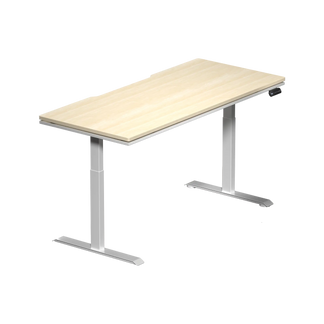
An electric height-adjustable standing desk removes that constraint entirely. It allows you to dial in a seated height that works precisely for your body and chair combination, and it introduces the ability to stand during extended sessions — breaking the static compression that a good gaming chair alone can't eliminate. Standing intermittently, even for 20 minutes per hour, meaningfully reduces lumbar disc load, improves circulation, and extends the period before fatigue sets in. For anyone spending five-plus hours daily across gaming and work, height adjustability isn't a luxury feature — it's the single highest-leverage ergonomic investment available at the desk level.
Height adjustability was once a premium differentiator exclusive to dedicated standing desk products. Today, it's a core specification to look for in any serious gaming desk purchase, and the gap between a well-engineered electric standing desk and a quality fixed gaming desk has narrowed to the point where the standing option is often the better long-term value simply through health impact alone. For a deeper look at ergonomic desk setup principles and how your desk and chair interact, the Blacklyte Gaming Hub covers the full picture.
Where a Regular Office Desk Still Wins
Fairness matters here, and there are genuine scenarios where a standard office desk is the better choice. If your setup consists of a laptop, a single external monitor, and a minimal peripheral footprint, a quality office desk at equivalent price will often be built from better materials than a gaming desk at the same price point — particularly in solid wood or real hardwood veneer constructions that gaming desks rarely offer below a premium price tier. The build-quality-per-dollar equation genuinely favors office furniture at the lower end of the market.
Aesthetic context is a real consideration too. If your desk space doubles as a work-from-home backdrop for video calls, a desk with aggressive angular design, visible RGB strips, and gaming-specific styling creates a visual environment that reads unprofessionally in a business context. A neutral office desk handles both contexts without compromise. And for genuinely small rooms — under 100 square feet — the compact footprints available in standard office desk form factors are often physically unavailable in gaming desk configurations, where the minimum width starts much wider.
How to Decide: A Practical Decision Framework
Use the following checklist against any desk you're evaluating — current or prospective:
- Width: Is it at least 55 inches wide if you're running dual monitors or a monitor plus a streaming setup? Under 47 inches is a constraint for any multi-display configuration.
- Depth: Is it deep enough (ideally 28 inches or more) to position monitors at a comfortable focal distance without crowding the front edge?
- Frame construction: Does it have a reinforced steel frame and adequate cross-bracing? Does the surface stay completely still under arm pressure?
- Load rating: Is the rated capacity meaningfully above the total weight of your setup, including a safety margin for dynamic load?
- Cable management: Does it include an integrated cable tray and at least one grommet hole — built in, not retrofitted?
- Surface treatment: Does it have rounded or chamfered edges rather than sharp ones? Is the surface texture compatible with large desk pads?
- Height adjustability: If you're sitting more than five hours daily, does it offer electric height adjustment with programmable memory positions?
If your current desk fails two or more of these, the setup compromise is real and ongoing. If it fails only one — and that one is height adjustability — upgrading to a standing desk is likely the highest-impact change you can make to your gaming and work environment. You can also compare desk specifications directly to evaluate how different models stack up across these criteria.
The Blacklyte Desk Lineup: Built From the Ground Up for Gaming
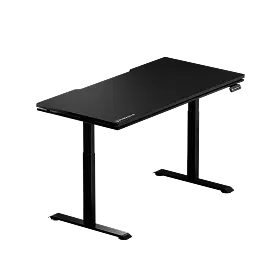
Blacklyte's desk lineup consists of two electric height-adjustable standing desks — the Atlas Desk and the Atlas Lite Standing Desk — both designed to address every factor in the framework above without compromise. Both feature integrated cable management with a purpose-built under-desk tray, built-in electrical sockets for keeping peripherals powered cleanly at the desk level, and electric height adjustment with programmable memory positions that let you return to your exact seated or standing height instantly.
Atlas Desk
The Atlas is Blacklyte's flagship desk, engineered specifically for high-performance gaming setups. Its three-stage leg column delivers exceptional stability across its full height range, rated to a 275.6 lb (125 kg) maximum load capacity — substantial headroom for a heavy multi-monitor rig with a full tower PC and accessories. The Atlas also features a magnetic surface system and integrated LED lighting columns controlled through Blacklyte's proprietary Atlas Driver software, which handles colour and effect selection from your PC. For content creators and competitive gamers who want a desk that performs as a complete environmental system rather than just a work surface, the Atlas is the purpose-built answer.
Atlas Lite Standing Desk
The Atlas Lite takes the same core mechanical engineering philosophy and packages it in a cleaner, more versatile form factor suited to both gaming and professional work environments. Its dual-motor system provides smooth, stable height transitions, and it's available in four sizes with a 31.5-inch depth across the range — significantly deeper than the 19 to 24 inches typical of comparable desks, which directly translates to better monitor positioning and more usable surface area. The Atlas Lite includes integrated cable management with a wide under-desk tray, a built-in electrical socket, and programmable memory positions for one-touch height switching. Its design language is clean enough to work in a professional home office context without compromising its gaming setup credentials — a real advantage for the growing majority of gamers who use the same desk for work and play. As TechRadar noted in their review, it "delivers great functionality for those who want a desk at their house that can serve as both work and play."
Both desks come with warranty coverage of up to five years, fast free shipping, and Blacklyte's 30-day easy return policy. To see the full specification breakdown side by side, visit the desk comparison page, or browse the full desk collection to explore sizing and color options.
The Bottom Line
The gaming desk label, on its own, means almost nothing. What separates a genuinely purpose-built gaming computer desk from a repainted office product is engineering — in the frame, the surface area, the cable infrastructure, the edge treatment, and above all, the decision to include or exclude height adjustability. A desk that passes all five criteria isn't just a better gaming surface; it's a better workspace, full stop, that pays ergonomic dividends across every hour you spend at it whether you're in a ranked match, editing content, or grinding through a work deadline.
If your current setup is asking you to work around your desk rather than work with it, the gap in performance is real. The right desk doesn't just hold your gear — it actively supports the posture, organization, and focus that long-session performance demands. For more on building a setup that performs as a complete ergonomic system, explore the Blacklyte Gaming Hub and the ergonomics resource pages.
Not Sure Which Desk Is Right for Your Setup?
Our team is happy to help you evaluate your space, setup weight, and ergonomic requirements — and point you toward the right desk and accessories for your specific needs.
Contact Us


