


Vai al contenuto
Quale sedia è giusta per te?
Models
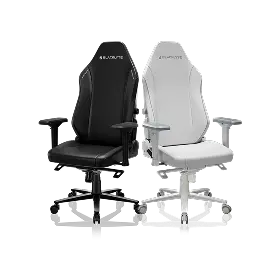
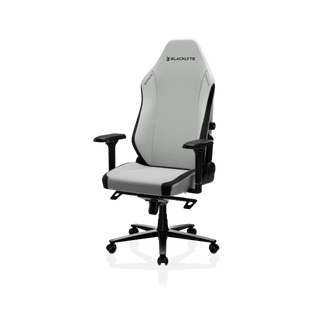
Sedia da gioco Athena Pro
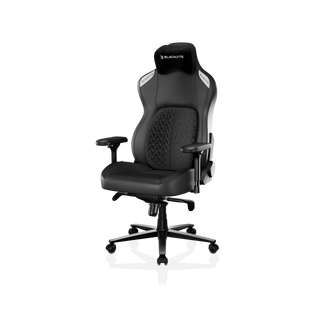
Sedia da gioco Kraken Pro
Atena Pro
Kraken Pro
Overview
Our premium chair experience, with upgraded dual-layer memory foam
Our flagship chair experience, redefining support, comfort, and craftsmanship.
Da €419 €469
Da €499 €599
Caratteristiche principali
Opzioni di rivestimento
Tessuto Blacklyte FlexKnit™
Rivestimento in tessuto di livello superiore. Fibre ad alta resistenza all'abrasione, comfort traspirante e una finitura piacevole al tatto.
Pelle sintetica Blacklyte DuraGen™
Pelle PU di nuova generazione con eco-certificazione. Ignifuga, resistente all'idrolisi e ai raggi UV, con una durabilità prolungata.
Pelle sintetica Blacklyte DuraGen™
Pelle PU eco-certificata di nuova generazione. Ignifuga, resistente all'idrolisi e ai raggi UV, con una durata prolungata.
Poggiatesta
Doppio poggiatesta magnetico
Cuscino poggiatesta curvo a doppio magnete
Supporto lombare
Supporto lombare integrato regolabile a 4 vie
Sistema di supporto lombare ad aria dinamico
Supporto lombare dinamico che fluttua e si blocca in posizione, adattandosi facilmente alla tua postura.
Cuscino della seduta
Memory foam a doppio strato potenziato
Memory foam ad alta densità
Rigidità
Medio-rigida con strato superiore imbottito e morbido
Medio-rigido
Braccioli
Braccioli 4D potenziati con finitura più morbida (Edizione rinforzata)
Braccioli 4D standard
Disponibilità
Taglia
Regular
Taglia unica che si adatta alla maggior parte delle corporature
Standard
Taglia unica adatta alla maggior parte delle corporature
Colori
Pelle
Nero, Bianco, Blu, Rosso vino
Tessuto
Nero, Gesso, Camouflage
Nero
Specifiche tecniche
Base a stella
Lega di alluminio
Lega di alluminio
Inclinazione schienale
90-149°
90-149°
Modalità dondolio
0-14°
0-14°
Ruote
Ruote silenziose in PU da 50 mm
Ultra-silenziose e delicate sui pavimenti
Ruote silenziose in PU da 50 mm
Ultra-silenziose e delicate sui pavimenti
Pistone a gas
Classe 4
Pistone a gas KGS (con ammortizzazione)
Classe 4
Pistone a gas KGS (con ammortizzazione)
Meccanismo di inclinazione
Meccanismo Frog
Meccanismo multifunzione Frog
Garanzia
Garanzia di 3 anni
estendibile fino a 5 anni
3 anni di garanzia
estendibile fino a 5 anni
Our premium chair experience, with upgraded dual-layer memory foam
Our flagship chair experience, redefining support, comfort, and craftsmanship.
Sedia da gioco Athena Pro
Sedia da gioco Kraken Pro
Da €419 €469
Da €499 €599
Vista compressa
Mostra solo le differenze
Caratteristiche principali
Opzioni di rivestimento
Tessuto Blacklyte FlexKnit™
Rivestimento in tessuto di livello superiore. Fibre ad alta resistenza all'abrasione, comfort traspirante e una finitura piacevole al tatto.
Pelle sintetica Blacklyte DuraGen™
Pelle PU di nuova generazione con eco-certificazione. Ignifuga, resistente all'idrolisi e ai raggi UV, con una durabilità prolungata.
Pelle sintetica Blacklyte DuraGen™
Pelle PU eco-certificata di nuova generazione. Ignifuga, resistente all'idrolisi e ai raggi UV, con una durata prolungata.
Poggiatesta
Doppio poggiatesta magnetico
Cuscino poggiatesta curvo a doppio magnete
Supporto lombare
Supporto lombare integrato regolabile a 4 vie
Sistema di supporto lombare ad aria dinamico
Supporto lombare dinamico che fluttua e si blocca in posizione, adattandosi facilmente alla tua postura.
Cuscino della seduta
Memory foam a doppio strato potenziato
Memory foam ad alta densità
Rigidità
Medio-rigida con strato superiore imbottito e morbido
Medio-rigido
Braccioli
Braccioli 4D potenziati con finitura più morbida (Edizione rinforzata)
Braccioli 4D standard
Disponibilità
Taglia
Regular
Taglia unica che si adatta alla maggior parte delle corporature
Standard
Taglia unica adatta alla maggior parte delle corporature
Colori
Pelle
Nero, Bianco, Blu, Rosso vino
Tessuto
Nero, Gesso, Camouflage
Nero
Specifiche tecniche
Base a stella
Lega di alluminio
Lega di alluminio
Inclinazione schienale
90-149°
90-149°
Modalità dondolio
0-14°
0-14°
Ruote
Ruote silenziose in PU da 50 mm
Ultra-silenziose e delicate sui pavimenti
Ruote silenziose in PU da 50 mm
Ultra-silenziose e delicate sui pavimenti
Pistone a gas
Classe 4
Pistone a gas KGS (con ammortizzazione)
Classe 4
Pistone a gas KGS (con ammortizzazione)
Meccanismo di inclinazione
Meccanismo Frog
Meccanismo multifunzione Frog
Garanzia
Garanzia di 3 anni
estendibile fino a 5 anni
3 anni di garanzia
estendibile fino a 5 anni
Quale scrivania è quella giusta per te?
Models
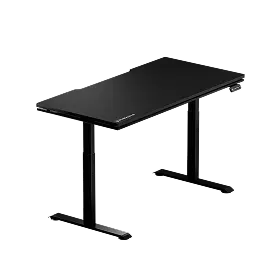
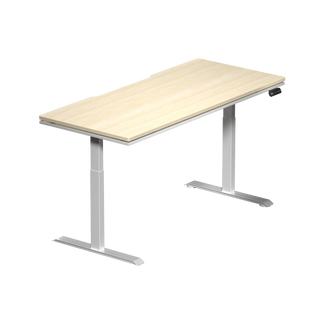
Scrivania in piedi Atlas Lite
Scrivania Atlas
Scrivania in piedi Atlas Lite
Scrivania Atlas
Overview
La nostra scrivania regolabile in altezza di nuova generazione, disponibile in quattro dimensioni e tre colori.
La nostra scrivania regolabile in altezza di prima generazione con illuminazione dinamica sincronizzata con la tua configurazione
Da €649 €699
Da €1.119 €1.199
Caratteristiche principali
Colonna di alimentazione integrata
Vano passacavi integrato
Superficie magnetica
100%
Compatibilità con accessori modulari per scrivania
Parzialmente compatibile
Intervallo di altezza
700 mm–1170 mm
(27,6″–46,1″)
720 mm–1370 mm
(28,3″–53,9″)
Controllo illuminazione
Memorie di altezza preimpostate
4
2
Disponibilità
Taglia
Piccola
1200 mm × 800 mm
(47,2″ × 31,5″)
Media
1400 mm × 800 mm
(55,1″ × 31,5″)
Grande
1600 mm × 800 mm
(63,0″ × 31,5″)
Extra Grande
1800 mm × 800 mm
(70,9″ × 31,5″)
Grande
1500 mm × 700 mm
(59,1″ × 27,6″)
Colori
Nero Ossidiana, Bianco Pietra di Luna, Quercia Naturale
Solo nero
Specifiche tecniche
Struttura del piano di lavoro
(Esterno) Laminato melaminico
(Interno) MDF
(Esterno) Rivestimento in PVC
(Interno) MDF con acciaio
Motori
Doppio motore elettrico
Gambes
Gambe a 2 stadi
Gambe a 3 stadi
Sistema anticollisione
Stabilità migliorata
Interruttore di alimentazione
Velocità del motore (sollevamento verticale)
25 mm/s (1″/s)
38 mm/s (1,5″/s)
Livello di rumore
≤48 dB
<48 dB
Capacità massima di carico distribuito
120 kg (265 lbs)
125 kg (275,6 lbs)
Carico massimo della potenza di uscita
100–240 V
100–240 V
Certificazioni
Garanzia
3 anni
3 anni
La nostra scrivania regolabile in altezza di nuova generazione, disponibile in quattro dimensioni e tre colori.
La nostra scrivania regolabile in altezza di prima generazione con illuminazione dinamica sincronizzata con la tua configurazione
Scrivania in piedi Atlas Lite
Scrivania Atlas
Da €649 €699
Da €1.119 €1.199
Vista compressa
Mostra solo le differenze
Caratteristiche principali
Colonna di alimentazione integrata
Vano passacavi integrato
Superficie magnetica
100%
Compatibilità con accessori modulari per scrivania
Parzialmente compatibile
Intervallo di altezza
700 mm–1170 mm
(27,6″–46,1″)
720 mm–1370 mm
(28,3″–53,9″)
Controllo illuminazione
Memorie di altezza preimpostate
4
2
Disponibilità
Taglia
Piccola
1200 mm × 800 mm
(47,2″ × 31,5″)
Media
1400 mm × 800 mm
(55,1″ × 31,5″)
Grande
1600 mm × 800 mm
(63,0″ × 31,5″)
Extra Grande
1800 mm × 800 mm
(70,9″ × 31,5″)
Grande
1500 mm × 700 mm
(59,1″ × 27,6″)
Colori
Nero Ossidiana, Bianco Pietra di Luna, Quercia Naturale
Solo nero
Specifiche tecniche
Struttura del piano di lavoro
(Esterno) Laminato melaminico
(Interno) MDF
(Esterno) Rivestimento in PVC
(Interno) MDF con acciaio
Motori
Doppio motore elettrico
Gambes
Gambe a 2 stadi
Gambe a 3 stadi
Sistema anticollisione
Stabilità migliorata
Interruttore di alimentazione
Velocità del motore (sollevamento verticale)
25 mm/s (1″/s)
38 mm/s (1,5″/s)
Livello di rumore
≤48 dB
<48 dB
Capacità massima di carico distribuito
120 kg (265 lbs)
125 kg (275,6 lbs)
Carico massimo della potenza di uscita
100–240 V
100–240 V
Certificazioni
Garanzia
3 anni
3 anni

Do Monitor Arms Really Improve Ergonomics?

di Blacklyte
blacklyte dual monitor arms

For anyone building a cleaner, more comfortable desk, a monitor arm can look like a small upgrade. A clamp, a metal arm, a floating screen. Simple. But for people who spend hours gaming, working, editing, streaming, or studying, that small change can affect the whole workstation.

The short answer: yes, monitor arms can improve ergonomics when they help position your screen at the right height, distance, and angle. They are not magic fixes for back pain or poor posture, but they make one of the most important ergonomic adjustments easier: placing the monitor where your neck, eyes, shoulders, and desk layout can work together. This matters because ergonomic workspace ideas should not start with aesthetics. They should start with the body.

Why Monitor Position Matters More Than People Think

Most bad desk setups have one quiet problem: the screen is in the wrong place.

A monitor that sits too low pulls your head forward. A screen that sits too high makes your neck tilt back. A display pushed too far away can make you lean forward. A second monitor placed too far to the side can keep your neck rotated for hours.

OSHA’s computer workstation guidance says the top of the monitor should be at or slightly below eye level, with the center of the screen normally 15 to 20 degrees below horizontal eye level. OSHA also recommends placing the monitor perpendicular to windows to help manage glare. Mayo Clinic gives similar advice: place the monitor straight in front of you, about an arm’s length away, generally between 20 and 40 inches from your face, with the top of the screen at or slightly below eye level.

A monitor arm helps because it makes these adjustments easier than a fixed stand. Instead of stacking books under a screen or accepting the factory stand height, you can raise, lower, pull forward, push back, tilt, rotate, or reposition the monitor as your setup changes. That flexibility is the real ergonomic value.

What a Monitor Arm Actually Improves

A monitor arm improves ergonomics in three practical ways: screen position, desk space, and adaptability.

Screen position is the biggest benefit. A good arm lets you bring the screen to your eyes instead of bringing your neck to the screen. UCLA Ergonomics recommends keeping the monitor directly in front of you, positioning it so you do not bend your neck up or down, and placing it at least 20 to 30 inches away.

Desk space is the benefit people notice fastest. Removing the bulky monitor stand frees up room for a keyboard, mouse, notebook, microphone, stream deck, speakers, or simply more breathing room. Blacklyte’s desk add-ons collection specifically positions monitor arms and workspace accessories around saving desk space, improving cable management, and building a cleaner gaming or office setup.

Adaptability matters for hybrid users. A remote worker may want the screen centered for spreadsheets during the day, then closer and slightly lower for gaming at night. A creator may need a vertical display for chat, code, or timelines. A student may move between laptop, monitor, and notes. Static monitor stands rarely support that kind of daily movement.

Monitor Arm vs. Monitor Stand

Setup choice Ergonomic benefit Limitation
Factory monitor stand Simple, included with monitor Often limited height, depth, and rotation
Riser or books Raises screen cheaply Fixed position, can create clutter
Single monitor arm Flexible height, depth, tilt, and desk space Must match monitor weight and VESA pattern
Dual monitor arm Better multi-screen control and cleaner layout Needs careful positioning to avoid neck rotation

A monitor arm is most useful when your current stand cannot place the screen where your body needs it. It is less useful if your monitor already sits at the right height and distance and your desk has enough space.

The Dual-Monitor Problem

Dual monitors can be powerful, but they can also create neck strain when both screens fight for attention.

If you use one screen most of the time, keep the primary monitor directly in front of you and place the secondary monitor beside it at a slight angle. If you use both screens equally, bring them closer together and treat them like one wide display. Blacklyte already supports this decision path with its single vs. dual monitor mount guide, which compares monitor desk mount options for ergonomics, productivity, and comfort.

This is where a dual monitor arm can be more than a tidy setup accessory. It lets you align both screens instead of living with two mismatched factory stands.

What to Check Before Buying a Monitor Arm

A monitor arm only improves ergonomics if it fits your actual workspace. Before choosing one, check:

Monitor size and weight. The arm must support the display safely. Ultrawide and heavier monitors need stronger arms.

VESA compatibility. Many monitor arms require VESA mounting holes. If your monitor does not support VESA, you may need an adapter.

Desk thickness and material. Clamp mounts need a solid desk edge. Grommet mounts may work better for certain desks.

Range of motion. Look for height, tilt, swivel, rotation, and depth adjustment.

Single or dual setup. Do not buy a dual arm just because it looks impressive. Buy it because your workflow needs two screens positioned well.

Blacklyte’s own monitor arm buying guide highlights practical checks like size, weight capacity, VESA fit, mounting options, and build quality. 

Are Monitor Arms Worth It for Gaming Setups?

For gamers, the ergonomic value depends on session length and screen behavior. Competitive players often keep one primary monitor centered and stable. Streamers may need one monitor for gameplay and another for chat, controls, or OBS. Casual players may simply want a cleaner desk and better posture.

Blacklyte’s positioning focuses on premium ergonomic gaming furniture for long-session comfort across gaming, work, and creation. The brand review also notes that Blacklyte sells a broader setup ecosystem, including gaming chairs, standing desks, monitor arms, and accessories. That ecosystem matters because a monitor arm works best as part of a complete setup, not as a lone solution.

A better chair supports the body. A better desk supports posture changes. A monitor arm supports visual alignment. Together, they make a workspace feel less like a pile of gear and more like a place designed around the person using it.

The Honest Limitation

A monitor arm will not fix every ergonomic problem. If your chair is too low, your desk is too high, your keyboard is too far away, or your feet are unsupported, a monitor arm can only solve part of the puzzle. Ergonomics is a system. Oregon OSHA’s workstation checklist looks at posture, chair support, keyboard and mouse placement, monitor distance, glare, desk clearance, and accessories together—not the monitor alone.

So the real question is not “Will a monitor arm improve ergonomics?” It is “Will it help your screen finally meet your body where it should?” For many long-hour gamers, remote workers, and creators, the answer is yes.

Final Takeaway

A monitor arm is one of the most practical ergonomic workspace ideas because it solves a daily problem: screens are often too low, too far away, off-center, or trapped by bulky stands. The right monitor arm gives you control over height, distance, angle, and desk space.

For a single-screen setup, explore the Blacklyte Atlas Monitor Arm for a cleaner, adjustable workstation. For multi-screen setups, the Blacklyte Atlas Dual Monitor Arm is the more natural fit when both monitors need stable positioning and better desk organization.
The strongest ergonomic setup is not the most expensive one. It is the one that keeps your screen, chair, desk, keyboard, and body working in the same direction.

Share article
Recommended Products View All Products >
Braccio per monitor Atlas Braccio per monitor Atlas
€30 spento
Braccio per monitor Atlas
Black
€99
€129
Shop now
Braccio per doppio monitor Atlas Braccio per doppio monitor Atlas
€50 spento
Braccio per doppio monitor Atlas
White
€159
€209
Shop now
Scrivania in piedi Atlas Lite Scrivania in piedi Atlas Lite
€50 spento
Scrivania in piedi Atlas Lite
Oak - Extra Large
€649
€699
Shop now

Grazie per esserti iscritto!

Questa email è stata registrata!

Acquista il look
Scegli Opzioni
this is just a warning
Accedi
Il tuo carrello