














How a Gaming Desk Improves Your Work and Gaming Setup at Home

For a long time, desks were simple. You bought one, placed it against a wall, and used it for whatever needed to get done. Work stayed on one side of life, gaming on the other. That separation doesn’t really exist anymore. Now it’s common to answer emails in the same place where you queue into a match later that night.
The problem is, most setups didn’t evolve with that shift. People are still trying to do everything on a desk that was never designed for it. That’s usually the point where a gaming desk starts to make sense—not as an upgrade for looks, but as a way to fix things that quietly slow you down every day. If you’ve noticed these issues in your workspace, exploring a Blacklyte gaming desk can help you optimize both work and play effortlessly.
Why Traditional Desks Fail for Long Work and Gaming Sessions
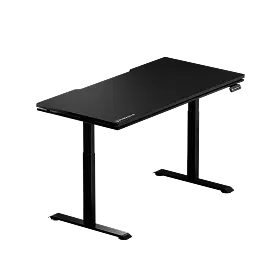
At first, nothing feels wrong. Your desk holds your essentials and gets the job done. But over time, small inconveniences start to stack. Space runs out, wires get tangled, and hours of work or gaming leave your shoulders stiff. You find yourself constantly shifting in your chair. Individually, these problems are small. Collectively, though, they start to make your setup uncomfortable. Typical desks weren’t designed for long sessions that switch between focused work and gaming intensity. Blacklyte gaming desks address these issues with wide surfaces, electric height adjustment, reinforced stability, and thoughtful cable routing for uninterrupted sessions.
Ergonomic Gaming Desks: Support Your Posture and Comfort
People often talk about ergonomics like it’s a bonus feature. In reality, it’s what determines whether you can stay focused for more than an hour without shifting around. A gaming desk tends to get the basics right. The height feels more intentional. There’s enough room for your arms to rest naturally. Your monitor sits where it should, instead of forcing you to lean forward slightly without noticing. Blacklyte Gaming Desks feature adjustable height and carefully designed edges to naturally support your posture during long work or gaming sessions.
These little adjustments quickly add up. You no longer need to think about sitting straight, because your posture is naturally supported. Over longer sessions with an ergonomic gaming desk, you notice it even more—your shoulders are less tense, and you don’t need to pause just to readjust. It’s a small difference that consistently improves your comfort.
Keep Your Gaming Desk Neat and Focused
Cable management is one of those things that sounds minor until you’ve experienced both sides. A messy setup doesn’t just look bad—it feels unfinished. You notice it when you reach under your desk and hit a bundle of wires, or when you try to clean and realize everything is tangled together. Gaming desks usually solve this in a practical way. For example, Blacklyte gaming desks have built-in cable trays and smart routing options that keep wires neatly organized and out of sight.
Once everything is in place, the desk feels easier to use. You’re not working around your setup anymore. And strangely enough, a cleaner space tends to keep you more focused. There’s less visual noise, fewer small distractions pulling your attention away.
How Desk Space Impacts Productivity and Gaming Performance
One thing people underestimate is how much desk space affects behavior. With a smaller or more limited desk, you start making compromises. Maybe your mouse movement is restricted. Maybe your second monitor is slightly off-angle. Maybe you just avoid adding anything new because there’s nowhere to put it.
A gaming desk removes most of those constraints. You get enough room to spread things out properly—keyboard, mouse, monitors, accessories—without everything feeling cramped together. If you’re running a dual or triple monitor setup, that extra width isn’t just helpful, it’s necessary. Stability changes how your setup feels without you realizing it. A desk that stays firm gives you confidence, particularly during fast-paced games. You only notice its absence when it starts to wobble.
Seamless Transition: Using a Gaming Desk for Work and Play
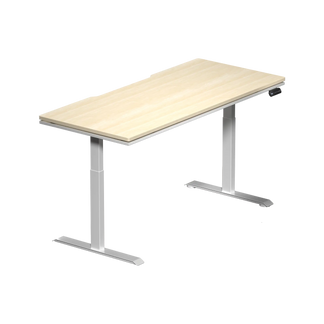
A gaming desk simplifies moving between work and play. Unlike a standard desk where you have to rearrange equipment, a gaming desk keeps your keyboard, mouse, and accessories ready for any task. Work during the day is neat and focused, while gaming later requires no setup changes. Over time, this ease of use makes your desk feel more functional and comfortable. With a Blacklyte gaming desk, you can switch from work to gaming without rearranging anything—explore our Atlas Gaming Desks and Atlas Lite Standing Desks to find the perfect fit for your setup.”
Why More People Are Moving to Standing Gaming Desks
Sitting for long hours used to be the default. Now, more people are starting to question it. A standing gaming desk doesn’t completely change how you work, but it gives you options. And that’s really the point. Some days, you stay seated. Other times, especially during longer sessions, you raise the desk and stand for a while. It breaks the routine without interrupting what you’re doing.

Height adjustment also helps fine-tune your setup in a way fixed desks can’t. Even a small difference in desk height can change how your arms and shoulders feel after a few hours. If you’re considering one, it’s worth looking into the standing gaming desk pros and cons and going through the top features and buying guide for the best electric standing desk before deciding. The flexibility tends to matter more than people expect.
Is a Gaming Desk Worth It for Home Office and Gaming?
It depends on how you use your space. If your desk is only for occasional use, a standard option might be enough. But if you’re spending several hours a day there—working, gaming, or both—the difference becomes easier to justify. A gaming desk isn’t solving a single problem. It’s addressing a collection of small limitations that most people get used to over time. Once those are gone, the setup simply feels better to use.
How to Choose the Right Gaming Desk for Your Space and Setup
Not all gaming desks are built the same, and picking the right one has more to do with your habits than anything else. If you’re working with limited space, size becomes the first constraint. In a larger room, you have more flexibility to build around your desk instead. Height adjustment is worth considering if you spend long hours at your setup. Stability matters if you’re using heavier equipment or multiple monitors. Then there’s cable management, which is easy to overlook—but difficult to live without once you’ve experienced a cleaner setup.
The goal isn’t to find the most feature-packed desk. It’s to find one that fits how you actually use your space every day. Choosing a Blacklyte gaming desk ensures you get adjustable height, strong stability, wide surfaces, and integrated cable management designed for serious gamers and remote workers.
Simple Gaming Desk Setup Tips for Work and Play
It’s easy to get caught up in complicated setups, especially when browsing premium gaming stations online. Often, all you really need is a clean desk, enough room to work comfortably, and a layout that doesn’t need constant fiddling. Anything beyond that is just extra.
FAQ: Gaming Desks for Work and Gaming Setup
Q1: Can a gaming desk be used for work?
Yes. Blacklyte gaming desks offer more space, better stability, and cleaner cable management, making them ideal for both work and gaming setups.
Q2: Is a standing gaming desk worth it?
Yes, especially for long hours. It lets you switch between sitting and standing, helping reduce fatigue and improve comfort.
Q3: What size gaming desk do I need?
Choose based on your space and equipment. A 40–48 inch desk suits a basic setup, 55–62 inches works for dual monitors, and 63+ inches is best for a full setup.
Q4: Are gaming desks better for posture?
Generally, yes. They support better monitor placement and arm positioning, which helps maintain a more natural posture.
Q5: How do I organize cables on a gaming desk?
Use built-in cable trays or holes, group cables together, and route them underneath the desk to keep the surface clean.
Conclusion
A good gaming desk can have a noticeable impact. Better cable management, more space, and the right height all add up, making both work and gaming feel more natural. Once you experience it, the benefits are clear.


