

Vai al contenuto
Quale sedia è giusta per te?
Models
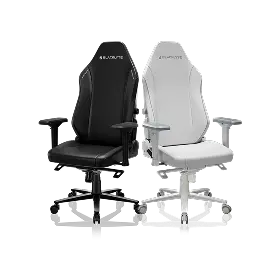
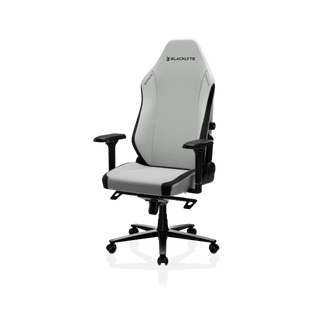
Sedia da gioco Athena Pro
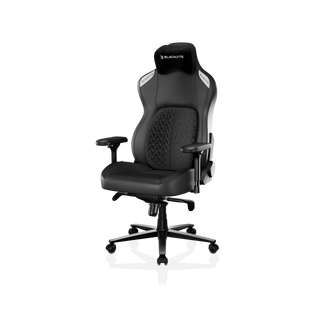
Sedia da gioco Kraken Pro
Atena Pro
Kraken Pro
Overview
Our premium chair experience, with upgraded dual-layer memory foam
Our flagship chair experience, redefining support, comfort, and craftsmanship.
Da €369 €469
Da €439 €599
Caratteristiche principali
Opzioni di rivestimento
Tessuto Blacklyte FlexKnit™
Rivestimento in tessuto di livello superiore. Fibre ad alta resistenza all'abrasione, comfort traspirante e una finitura piacevole al tatto.
Pelle sintetica Blacklyte DuraGen™
Pelle PU di nuova generazione con eco-certificazione. Ignifuga, resistente all'idrolisi e ai raggi UV, con una durabilità prolungata.
Pelle sintetica Blacklyte DuraGen™
Pelle PU eco-certificata di nuova generazione. Ignifuga, resistente all'idrolisi e ai raggi UV, con una durata prolungata.
Poggiatesta
Doppio poggiatesta magnetico
Cuscino poggiatesta curvo a doppio magnete
Supporto lombare
Supporto lombare integrato regolabile a 4 vie
Sistema di supporto lombare ad aria dinamico
Supporto lombare dinamico che fluttua e si blocca in posizione, adattandosi facilmente alla tua postura.
Cuscino della seduta
Memory foam a doppio strato potenziato
Memory foam ad alta densità
Rigidità
Medio-rigida con strato superiore imbottito e morbido
Medio-rigido
Braccioli
Braccioli 4D potenziati con finitura più morbida (Edizione rinforzata)
Braccioli 4D standard
Disponibilità
Taglia
Regular
Taglia unica che si adatta alla maggior parte delle corporature
Standard
Taglia unica adatta alla maggior parte delle corporature
Colori
Pelle
Nero, Bianco, Blu, Rosso vino
Tessuto
Nero, Gesso, Camouflage
Nero
Specifiche tecniche
Base a stella
Lega di alluminio
Lega di alluminio
Inclinazione schienale
90-149°
90-149°
Modalità dondolio
0-14°
0-14°
Ruote
Ruote silenziose in PU da 50 mm
Ultra-silenziose e delicate sui pavimenti
Ruote silenziose in PU da 50 mm
Ultra-silenziose e delicate sui pavimenti
Pistone a gas
Classe 4
Pistone a gas KGS (con ammortizzazione)
Classe 4
Pistone a gas KGS (con ammortizzazione)
Meccanismo di inclinazione
Meccanismo Frog
Meccanismo multifunzione Frog
Garanzia
Garanzia di 3 anni
estendibile fino a 5 anni
3 anni di garanzia
estendibile fino a 5 anni
Our premium chair experience, with upgraded dual-layer memory foam
Our flagship chair experience, redefining support, comfort, and craftsmanship.
Sedia da gioco Athena Pro
Sedia da gioco Kraken Pro
Da €369 €469
Da €439 €599
Vista compressa
Mostra solo le differenze
Caratteristiche principali
Opzioni di rivestimento
Tessuto Blacklyte FlexKnit™
Rivestimento in tessuto di livello superiore. Fibre ad alta resistenza all'abrasione, comfort traspirante e una finitura piacevole al tatto.
Pelle sintetica Blacklyte DuraGen™
Pelle PU di nuova generazione con eco-certificazione. Ignifuga, resistente all'idrolisi e ai raggi UV, con una durabilità prolungata.
Pelle sintetica Blacklyte DuraGen™
Pelle PU eco-certificata di nuova generazione. Ignifuga, resistente all'idrolisi e ai raggi UV, con una durata prolungata.
Poggiatesta
Doppio poggiatesta magnetico
Cuscino poggiatesta curvo a doppio magnete
Supporto lombare
Supporto lombare integrato regolabile a 4 vie
Sistema di supporto lombare ad aria dinamico
Supporto lombare dinamico che fluttua e si blocca in posizione, adattandosi facilmente alla tua postura.
Cuscino della seduta
Memory foam a doppio strato potenziato
Memory foam ad alta densità
Rigidità
Medio-rigida con strato superiore imbottito e morbido
Medio-rigido
Braccioli
Braccioli 4D potenziati con finitura più morbida (Edizione rinforzata)
Braccioli 4D standard
Disponibilità
Taglia
Regular
Taglia unica che si adatta alla maggior parte delle corporature
Standard
Taglia unica adatta alla maggior parte delle corporature
Colori
Pelle
Nero, Bianco, Blu, Rosso vino
Tessuto
Nero, Gesso, Camouflage
Nero
Specifiche tecniche
Base a stella
Lega di alluminio
Lega di alluminio
Inclinazione schienale
90-149°
90-149°
Modalità dondolio
0-14°
0-14°
Ruote
Ruote silenziose in PU da 50 mm
Ultra-silenziose e delicate sui pavimenti
Ruote silenziose in PU da 50 mm
Ultra-silenziose e delicate sui pavimenti
Pistone a gas
Classe 4
Pistone a gas KGS (con ammortizzazione)
Classe 4
Pistone a gas KGS (con ammortizzazione)
Meccanismo di inclinazione
Meccanismo Frog
Meccanismo multifunzione Frog
Garanzia
Garanzia di 3 anni
estendibile fino a 5 anni
3 anni di garanzia
estendibile fino a 5 anni
Quale scrivania è quella giusta per te?
Models
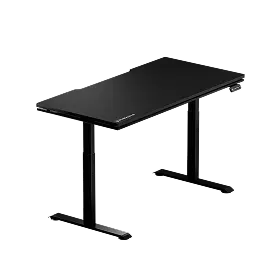
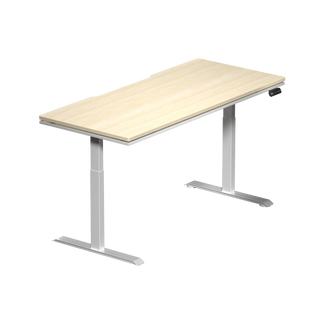
Scrivania in piedi Atlas Lite
Scrivania Atlas
Scrivania in piedi Atlas Lite
Scrivania Atlas
Overview
La nostra scrivania regolabile in altezza di nuova generazione, disponibile in quattro dimensioni e tre colori.
La nostra scrivania regolabile in altezza di prima generazione con illuminazione dinamica sincronizzata con la tua configurazione
Da €609 €699
Da €1.079 €1.199
Caratteristiche principali
Colonna di alimentazione integrata
Vano passacavi integrato
Superficie magnetica
100%
Compatibilità con accessori modulari per scrivania
Parzialmente compatibile
Intervallo di altezza
700 mm–1170 mm
(27,6″–46,1″)
720 mm–1370 mm
(28,3″–53,9″)
Controllo illuminazione
Memorie di altezza preimpostate
4
2
Disponibilità
Taglia
Piccola
1200 mm × 800 mm
(47,2″ × 31,5″)
Media
1400 mm × 800 mm
(55,1″ × 31,5″)
Grande
1600 mm × 800 mm
(63,0″ × 31,5″)
Extra Grande
1800 mm × 800 mm
(70,9″ × 31,5″)
Grande
1500 mm × 700 mm
(59,1″ × 27,6″)
Colori
Nero Ossidiana, Bianco Pietra di Luna, Quercia Naturale
Solo nero
Specifiche tecniche
Struttura del piano di lavoro
(Esterno) Laminato melaminico
(Interno) MDF
(Esterno) Rivestimento in PVC
(Interno) MDF con acciaio
Motori
Doppio motore elettrico
Gambes
Gambe a 2 stadi
Gambe a 3 stadi
Sistema anticollisione
Stabilità migliorata
Interruttore di alimentazione
Velocità del motore (sollevamento verticale)
25 mm/s (1″/s)
38 mm/s (1,5″/s)
Livello di rumore
≤48 dB
<48 dB
Capacità massima di carico distribuito
120 kg (265 lbs)
125 kg (275,6 lbs)
Carico massimo della potenza di uscita
100–240 V
100–240 V
Certificazioni
Garanzia
3 anni
3 anni
La nostra scrivania regolabile in altezza di nuova generazione, disponibile in quattro dimensioni e tre colori.
La nostra scrivania regolabile in altezza di prima generazione con illuminazione dinamica sincronizzata con la tua configurazione
Scrivania in piedi Atlas Lite
Scrivania Atlas
Da €609 €699
Da €1.079 €1.199
Vista compressa
Mostra solo le differenze
Caratteristiche principali
Colonna di alimentazione integrata
Vano passacavi integrato
Superficie magnetica
100%
Compatibilità con accessori modulari per scrivania
Parzialmente compatibile
Intervallo di altezza
700 mm–1170 mm
(27,6″–46,1″)
720 mm–1370 mm
(28,3″–53,9″)
Controllo illuminazione
Memorie di altezza preimpostate
4
2
Disponibilità
Taglia
Piccola
1200 mm × 800 mm
(47,2″ × 31,5″)
Media
1400 mm × 800 mm
(55,1″ × 31,5″)
Grande
1600 mm × 800 mm
(63,0″ × 31,5″)
Extra Grande
1800 mm × 800 mm
(70,9″ × 31,5″)
Grande
1500 mm × 700 mm
(59,1″ × 27,6″)
Colori
Nero Ossidiana, Bianco Pietra di Luna, Quercia Naturale
Solo nero
Specifiche tecniche
Struttura del piano di lavoro
(Esterno) Laminato melaminico
(Interno) MDF
(Esterno) Rivestimento in PVC
(Interno) MDF con acciaio
Motori
Doppio motore elettrico
Gambes
Gambe a 2 stadi
Gambe a 3 stadi
Sistema anticollisione
Stabilità migliorata
Interruttore di alimentazione
Velocità del motore (sollevamento verticale)
25 mm/s (1″/s)
38 mm/s (1,5″/s)
Livello di rumore
≤48 dB
<48 dB
Capacità massima di carico distribuito
120 kg (265 lbs)
125 kg (275,6 lbs)
Carico massimo della potenza di uscita
100–240 V
100–240 V
Certificazioni
Garanzia
3 anni
3 anni

Single vs Dual Monitor Mount: Which Should You Choose?

di Blacklyte

single vs dual monitor mount

If you’re looking for the best monitor mount for your desk, you’re not alone — many people face the same dilemma when upgrading their workspace. Should you go with a single monitor arm desk mount or a dual monitor arm desk mount? Once your monitor is lifted off its bulky factory stand and placed on a stable, adjustable mount, the difference is immediately obvious: more space, cleaner lines, and a setup that actually feels comfortable to work at. The real question isn’t whether you need a monitor arm mount — it’s which type fits the way you actually work.

Benefits of a Single Monitor Mount

A single monitor mount does exactly what it sounds like — it supports one screen and lets you move it into a comfortable position. For many people, a single monitor desk mount is already a huge upgrade over a fixed stand.

Blacklyte atlas single monitor mount

In real-world use, a single monitor mount works best when:

  • Your desk space is limited
  • You prefer a clean and minimal layout
  • You mostly focus on one main task or application
  • You want something easy to install and adjust

It also tends to be lighter, cheaper, and quicker to set up, which makes it a popular choice for students, writers, casual gamers, and anyone working from a laptop plus one external monitor. That said, there is an obvious limitation — if your workflow regularly jumps between apps or documents, one screen can start to feel cramped pretty quickly.

Benefits of a Dual Monitor Mount

A dual monitor mount is a different story. If you're selecting a dual monitor arm, understanding how it improves multitasking and workflow is especially important. Instead of trying to fit everything into one display, with a dual monitor desk mount, you get two separate screens you can position independently.

Blacklyte atlas dual monitor mount

People who benefit the most from this setup usually fall into one of these groups:

  • Programmers switching between code and preview
  • Designers and video editors working across tools and timelines
  • Analysts, traders, and spreadsheet-heavy roles
  • Remote workers juggling communication and project windows
  • Streamers who need a secondary screen for chat or monitoring

The big advantage is simple: less tab-switching, more visible workspace.
The trade-offs?

  • Higher cost
  • Heavier and more demanding on desk stability
  • Slightly more effort during installation

But for users who genuinely multitask, the improvement in workflow tends to outweigh the downsides very quickly.

Types of Monitor Mounts: Single vs Dual Comparison

If you're selecting a monitor arm but aren’t sure which type makes the most sense, the comparison below makes the decision much easier.

Factor Single monitor mount Dual monitor mount
Number of screens 1 2
Desk space use Compact & minimal Requires more space
Productivity level Basic to moderate High productivity & multitasking
Installation Simple Moderate
Cost Lower Higher
Adjustability Flexible Highly flexible (two screens)
Best for Minimalists, casual users, students Professionals, creators, multitaskers


Ergonomics — Posture, Eye Level, and Comfort

Ergonomically, both single and dual monitor mounts can be ergonomic monitor mounts when positioned correctly. The difference really comes down to how you set them up in real life, not just what the specs say. A good adjustable monitor mount simply gives you the flexibility to dial things in until they feel natural. 

Here’s what tends to work best in everyday use:

  • Place your main screen directly in front of you so you’re not twisting your body to look at it.
  • Adjust the height so that you’re roughly looking at the top third of the display — this keeps your neck in a relaxed position instead of constantly looking down.
  • Try to sit about 20–28 inches (50–70 cm) away from the screen — basically around an arm’s length. If you find yourself leaning in, you’re probably too far back.
  • With two monitors, aim to keep your neck rotation within about 30 degrees when glancing between screens. If you have to turn your head dramatically, the layout likely needs tweaking.

Dual setups are where positioning really matters. If one screen sits much higher or farther away than the other, you’ll start to feel it in your neck pretty quickly. But when both monitors are aligned at similar height and distance, a dual setup can feel just as comfortable as a single screen, while giving you the bonus of extra workspace.

Productivity & Workflow: Who Benefits More From Each Setup?

Dual monitor mounts are better for:

  • Programmers writing code while previewing output
  • Designers and video editors using timeline tools
  • Office users comparing documents or spreadsheets
  • Streamers or content creators monitoring chat and overlays
  • Traders and analysts watching multiple dashboards

More screen space means fewer window switches and more focus.

Single monitor mounts are better for:

  • Minimalist work environments
  • Small desks or compact rooms
  • Gaming-focused setups with one primary display
  • Users who value simplicity over multitasking

If your workflow revolves around one main task at a time, a single monitor mount keeps things clean and efficient.

Desk Space, Layout, and Room Size Considerations

Before choosing, consider how much space your desk and room actually provide:

  • Small desks or narrow tables → single monitor mount is usually more practical
  • Large desks or corner setups → dual monitor mounts fit comfortably
  • Limited wall clearance or shallow depth may restrict dual-arm positioning
  • Clamp or grommet mounting may also influence your decision

If you’re using an ultrawide display, you may even find that one large monitor on a single arm replaces the need for two separate screens.

Budget & Value: Which Option Offers Better Return?

A single monitor mount is more budget-friendly and delivers excellent value for:

  • New setups
  • Students
  • Compact home offices

A dual monitor mount costs more upfront, but the investment pays off if:

  • You multitask daily
  • Your work depends on speed and workflow efficiency
  • Screen space directly impacts your productivity

Think of it less as a gadget and more as a productivity tool.

Monitor Mount Stability, Weight Capacity & Compatibility

Not all monitor desk mounts are built the same. When comparing options, check:

  • Maximum weight capacity per mount
  • Supported monitor size
  • Whether the mount arm uses a gas-spring mechanism or mechanical joints
  • Compatibility with ultrawide or curved monitors

Dual arm mounts may place more pressure on the desk mount, so a solid desk surface and high-quality arm mount are important for long-term stability.

When Should You Upgrade From a Single Mount to a Dual Mount?

You may be ready to switch if:

  • Your workload has grown beyond a single screen
  • You’ve moved into remote work or hybrid office mode
  • You frequently multitask between tools, charts, or editing panels
  • You want a smoother and more efficient daily workflow

Many users start with one monitor — then upgrade when productivity demands increase. If this sounds like you, upgrading to a Blacklyte dual monitor mount is a practical next step.

Final Recommendation: Which One Should You Choose?

Whether you choose a single or dual monitor mount, upgrading to a proper arm is already a win for your desk, posture, and workflow. If you’re unsure which path to take, a Blacklyte dual monitor mount is a reliable way to future-proof your setup — giving you more screen space when you need it, a cleaner desk when you don’t, and the build quality to support your work for years to come.

Share article
Recommended Products View All Products >
Braccio per doppio monitor Atlas Braccio per doppio monitor Atlas
€50 spento
Braccio per doppio monitor Atlas
White
€159
€209
Shop now
Braccio per monitor Atlas Braccio per monitor Atlas
€30 spento
Braccio per monitor Atlas
Black
€99
€129
Shop now

Grazie per esserti iscritto!

Questa email è stata registrata!

Acquista il look
Scegli Opzioni
this is just a warning
Accedi
Il tuo carrello