









Metal Gaming Desks: Where the Metal Actually Is — and Where It Isn't
If you've spent any time shopping for a gaming desk, you've probably seen "metal gaming desk" plastered across listings for products that range wildly in price, weight, and actual construction. Some are full steel platforms that could survive a move across three apartments. Others are MDF boards wearing a thin metal skin and steel legs, marketed with the same bold language. The difference matters enormously — for stability, longevity, and whether your dual-monitor setup stays planted during a heated match or starts to sag six months in.
This guide cuts through the label and gets into the construction. We'll break down every component of a typical gaming desk, explain exactly where manufacturers use metal, where they don't, and what the marketing language often leaves out. By the end, you'll know precisely what questions to ask before spending your money — and what genuinely well-engineered desk construction looks like.
What Does 'Metal Gaming Desk' Actually Mean?
Here's the short answer: it depends entirely on which part of the desk is metal. The term "metal gaming desk" has no standardized definition in the furniture industry, which means it can accurately describe anything from a full-steel welded chassis to a particleboard surface with powder-coated steel legs. Both products can carry the same label on a retail listing. Neither description is technically wrong — but one is a far cry from what most buyers imagine when they picture a "metal" desk.
The confusion is widespread enough that tech forums and product comment sections regularly surface the same frustration: buyers expecting a primarily metal construction discover that their "metal" desk has a composite wood top with metal hardware holding it together. Understanding the anatomy of a gaming desk — and what materials serve what function — is the most useful thing you can do before making a purchase decision.
The Anatomy of a Gaming Desk: Breaking Down Each Component
A gaming desk is essentially four distinct systems working together: the legs, the frame or crossbeam structure, the tabletop surface, and any integrated hardware (cable management, power outlets, lighting, etc.). Metal can appear in any or all of these areas — and manufacturers make different material choices in each zone based on cost, function, and the aesthetic they're going for. Let's work through them one by one.
- Legs: This is the most consistently metal component across the gaming desk category. Whether the legs are round steel tubes, square-profile aluminum extrusions, or motorized lifting columns, the legs almost always involve some form of metal construction.
- Frame / crossbar structure: This is the structural skeleton that ties the legs together and mounts to the underside of the tabletop. High-quality desks use welded or bolted steel crossbeams here. Budget options may skip internal bracing entirely.
- Tabletop surface: This is where material choices diverge most dramatically. Options include solid steel, MDF (medium-density fiberboard) with a metal veneer or laminate, MDF sandwiched between steel sheets, or engineered wood with a textured surface coating. All can appear in a "metal desk" listing depending on which part the brand emphasizes.
- Integrated hardware: Cable trays, built-in power outlets, magnetic accessories, and lighting systems add functionality. These are almost always metal or plastic components mounted onto the main structure.
The critical insight is that most gaming desk marketing focuses on the most metal-intensive component — usually the legs or frame — and applies the "metal" label to the whole product. That's not always misleading, but it does require you to read spec sheets carefully rather than rely on the headline description alone.
The Frame: The Part That Matters Most
If you only investigate one part of a gaming desk's construction, make it the frame. The frame is the desk's structural backbone — it determines how rigid the surface feels under load, how much wobble you'll experience when typing or shifting monitors, and how well the desk holds up after years of daily use. A well-engineered steel frame transforms even a non-metal tabletop into a stable, long-lasting platform. A weak or poorly braced frame undermines even a premium surface material.
Steel is the most common and most capable frame material. It offers exceptional rigidity under load and resists the flex and vibration that make a desk feel cheap over time. The thickness of the steel tubing matters — thicker-gauge steel provides greater stiffness, particularly at wider desk spans where lateral flex under a heavy monitor array can become noticeable. Well-built frames also use internal crossbars or under-desk support rails to prevent "racking," which is the twisting motion that creates a wobbly feel.
For height-adjustable (standing) desks specifically, the frame takes on even more responsibility. The lifting columns must maintain stability not just at a single fixed height but across the full travel range of the mechanism — which introduces engineering challenges that fixed-height desks simply don't face. Look for multi-stage columns (three stages rather than two where possible), as additional overlap between column sections significantly improves rigidity at taller heights. The base footprint width also matters: wider feet resist tipping and lateral movement more effectively than a narrow stance.
The Tabletop Truth: Steel Surface, MDF Core, or Both?
The tabletop is where the "metal gaming desk" label gets most complicated — and most interesting. There are four real-world constructions you'll encounter, each with different performance characteristics:
Full steel or carbon steel surface: True all-metal tops are exceptionally durable and can support very high loads. They're also cold to the touch, prone to fingerprint visibility, and significantly heavier than composite alternatives. Some premium desks use a floating carbon steel surface — machined thin enough to look sleek while retaining structural integrity. These are genuinely metal tops, though they still typically require a steel or composite structural layer beneath.
MDF core with a metal or textured laminate: This is the most common construction in the mid-range gaming desk market. MDF (medium-density fiberboard) provides a smooth, stable surface that resists the warping and seasonal movement of solid wood. A metal-effect laminate or powder-coated vinyl finish is applied over it, giving a visual and tactile impression of metal without the weight or cost. These tops are practical, durable in normal use, and significantly lighter than solid steel.
MDF sandwiched between steel sheets: Some desks use a hybrid construction — MDF core laminated between layers of steel sheeting. This approach captures benefits from both materials: the dimensional stability and lighter weight of MDF, combined with the rigidity and surface hardness of steel. Crucially, this construction also enables magnetic surface features, since magnets adhere to the steel layer on top. The underside is usually non-magnetic MDF, which is worth knowing if you plan to route cables or attach accessories magnetically from below.
Particleboard or chipboard with a metal frame: Entry-level "metal" desks often pair a thin-profile particleboard top with robust steel legs. The structural integrity comes entirely from the frame; the top itself contributes little. These desks can still be quite stable if the frame is well-engineered, but the top surface is the first thing to show wear — and it's worth knowing that's what you're buying.
Steel vs. Aluminum Frames: Which Is Better?
Steel and aluminum both appear regularly in gaming desk construction, particularly in the frame and legs. They have meaningfully different properties, and the right choice depends on what you prioritize. Steel is denser and more rigid — for standing desks or setups with heavy multi-monitor arrays, a reinforced steel frame provides greater resistance to wobble under load. Aluminum is lighter and naturally corrosion-resistant, making it a popular choice for the aesthetic exterior of desk legs, base plates on chairs, and modular components where visual finish matters as much as raw strength.
In practice, many well-engineered desks use steel for their internal structural elements (frames, lifting columns, reinforcing crossbeams) and aluminum or aluminum-alloy components for visible external parts where weight savings and finish quality are priorities. Neither material is universally superior — the engineering behind how each is used matters far more than the material alone. A thick-gauge steel crossbeam is more valuable than a thin aluminum one, regardless of what the spec sheet calls it.
Red Flags to Watch in Metal Desk Marketing
Once you know what to look for, the language gaps in gaming desk marketing become easy to spot. Here are the most common signals that a "metal gaming desk" listing is emphasizing its most metal-adjacent feature rather than giving you the full picture:
- "Metal frame" with no tabletop material specified: If the product listing celebrates the steel frame but never describes what the top is made of, check the spec sheet. The top is almost certainly MDF or particleboard.
- "Carbon fiber surface": This usually describes a textured vinyl laminate designed to look like carbon fiber — not an actual carbon fiber composite. Genuine carbon fiber tabletops exist but are rare and expensive. Treat this phrase as cosmetic unless there's technical documentation to back it up.
- Magnetic features without a confirmed steel surface: A magnetic desk mat or accessory system only works if the tabletop has a steel layer on top. Confirm this explicitly — some "magnetic" desk systems only work along the edges or specific inlaid strips, not across the full surface.
- Weight that seems too light for an all-metal desk: Full steel desk surfaces are heavy. A desk listed at under 40 lbs for a 150cm (59") span is almost certainly not a full metal top, regardless of how the listing describes it.
- No mention of gauge, thickness, or load capacity: Quality manufacturers are specific about steel gauge and rated weight capacity because those figures are a genuine selling point. Vague materials language ("premium metal," "heavy-duty steel") without specifications is often a sign that the metal content is minimal.
What a Well-Built Metal Gaming Desk Actually Looks Like
A well-engineered gaming desk doesn't need to be entirely metal to perform like one. In fact, most of the best-performing desks in the market combine materials intelligently — using metal where rigidity and load-bearing matter most (the frame, legs, and crossbeam structure) and composite or engineered surfaces where stability, weight distribution, and surface quality are the priority. The result is a desk that's structurally sound without being unnecessarily heavy or cost-prohibitive.
What separates a genuinely well-built desk from a marketing-heavy one is specificity. Premium manufacturers are transparent about their construction: they specify frame material and gauge, describe tabletop construction in detail, publish weight ratings, and back their products with meaningful warranties. That level of transparency reflects engineering confidence — and it's the clearest signal that a brand has actually thought through their construction choices rather than just styled them.
Cable management, integrated power, and smart features matter too — but only once the structural foundation is right. A desk that flexes under your monitor array is a problem no cable tray can fix. Get the frame and surface construction right first; treat everything else as a bonus.
Height-Adjustable vs. Fixed Metal Gaming Desks
The height-adjustable vs. fixed debate is genuinely worth thinking through before you buy. Fixed-height desks have an inherent structural advantage: with no moving parts, the frame is a single rigid unit, and legs can be bolted directly to crossbeams and the tabletop in a way that leaves no mechanical play. For a purely static battlestation with a known, comfortable chair height, a fixed-height desk can offer maximum rigidity at a given price point.
Height-adjustable standing desks, however, offer something fixed desks can't: the ability to shift posture throughout the day. This matters for long gaming sessions and for anyone who doubles their setup as a workstation. The ergonomic case for alternating between sitting and standing positions is well established. The key is that a well-engineered standing desk — with a robust steel frame, quality lifting columns, and a stable base footprint — doesn't have to sacrifice meaningful rigidity to gain that adjustability. Poor-quality standing desks wobble at height; quality-built ones don't. The difference is almost entirely in the engineering of the frame, not the concept itself.
If you're investing in a desk for both gaming and daily work use, a quality height-adjustable option is almost always the better long-term choice. The value of being able to shift position during a five-hour session — or during a full workday — compounds significantly over time. You can compare desk specifications side by side to understand what separates entry-level and premium standing desk builds.
How the Blacklyte Atlas Desks Are Built
At Blacklyte, we don't use the word "metal" as a shorthand for a marketing aesthetic. Our metal gaming desks are built to a specific engineering standard, and we're transparent about exactly what that means in construction terms.
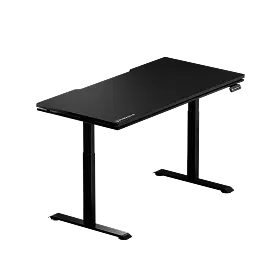
The Atlas Desk is our flagship height-adjustable desk, and its most distinctive construction feature is the magnetic surface — a genuine magnetic tabletop that allows compatible accessories and desk mats to anchor securely across the full working area, not just along the edges. This requires an actual steel layer integrated into the surface, not a cosmetic finish. The Atlas also features a built-in electrical socket and integrated cable management, so the clean-line aesthetic you see in photos is the same one you actually live with. Smart lighting controls are handled through the proprietary Atlas Driver software, giving you colour and effect control over the desk's lighting from your PC; height and memory presets are set on the desk's own keypad.
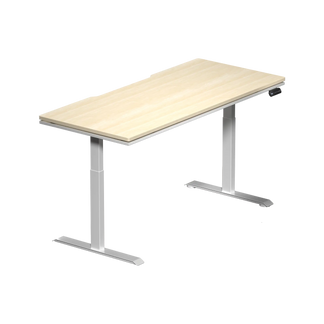
The Atlas Lite Standing Desk takes the same approach to integrated functionality — built-in power socket, cable management, and a steel frame engineered for stability across its full height range — in a two-stage column build. It's designed for gamers who want standing-desk ergonomics without giving up the integrated features they'd expect from a premium gaming desk. Both desks are covered by a warranty of up to 5 years, which reflects our confidence in the construction longevity.
Both Atlas desks were developed with the same engineering ethos behind our gaming chairs: every design decision is made with long-session performance in mind, not just first impressions on a spec sheet. If you want to see how the Atlas and Atlas Lite compare in detail — dimensions, height range, surface area, and feature set — our desk comparison page lays it all out side by side.
Know What You're Buying Before You Buy It
The "metal gaming desk" label covers an enormous range of actual constructions — from full steel chassis platforms to MDF tops on steel legs. Neither extreme is automatically better or worse, but understanding exactly where the metal is (and what it's doing structurally) lets you evaluate value rather than just price. Focus on the frame first: a well-engineered steel frame with proper crossbeam bracing is the single most impactful quality indicator in any desk. Then look at the tabletop construction and what the manufacturer actually claims about it. Transparent specs, published weight ratings, and meaningful warranty coverage are all signs that a brand has built something worth backing.
When the frame is right, everything else — surface finish, cable management, integrated power, smart features — can do its job properly. That's the standard we build to at Blacklyte, and it's the standard any serious gaming desk should meet. Explore the full Blacklyte desk lineup or browse our complete product range to see how engineering-first design translates into a setup that holds up session after session.
Still Have Questions About Desk Construction?
Our team knows gaming furniture construction inside and out. Whether you're comparing materials, trying to spec out the right desk for your setup, or just want a straight answer — we're here.
Contact Us


