







Best Gaming Chair for Back Support: Top Ergonomic Picks for Spine Health
Finding the best gaming chair for back support is no longer only about choosing a chair with a cool design or racing-style appearance. For gamers, streamers, remote workers, and creators who spend several hours sitting every day, back support has become one of the most important factors when choosing a chair.
A gaming chair should do more than look good in a setup. The right ergonomic chair should help maintain a healthier sitting position, provide adjustable support where your body needs it most, and reduce discomfort caused by long gaming sessions or extended desk work.
For buyers searching for a gamer chair back support solution, the key features to evaluate are lumbar adjustment, seat support, recline flexibility, armrest positioning, and overall ergonomic design.
What Is the Best Gaming Chair for Back Support?
The best gaming chair for back support is one that offers adjustable lumbar support, ergonomic seat design, proper spine alignment, and enough customization to fit your body type and sitting habits.
For most gamers and hybrid workers, a chair with built-in lumbar adjustment is a stronger choice than a basic gaming chair with only a fixed pillow. Adjustable support allows users to fine-tune the chair based on their posture, gaming style, and working position.
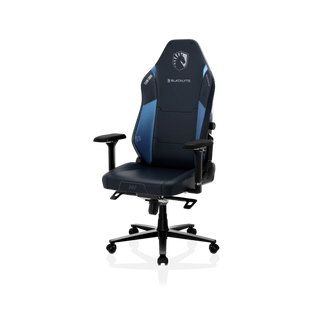
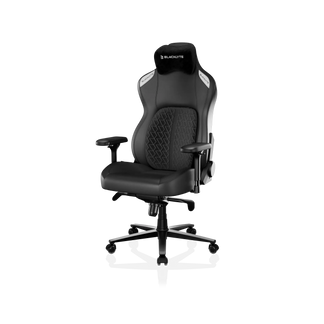
Among ergonomic gaming chairs, models such as the Blacklyte Athena Pro and Blacklyte Kraken Pro stand out because they focus on long-session comfort with features such as adjustable lumbar systems, memory foam cushioning, and ergonomic support designed for gaming, work, and creative tasks.
Why Back Support Matters in a Gaming Chair
Many people associate gaming chairs with appearance first: aggressive designs, colorful materials, and a professional esports look. However, the biggest difference between an average chair and a supportive ergonomic gaming chair is what happens after several hours of use.
When sitting for long periods, users often experience common problems:
- Lower back discomfort after gaming sessions
- Shoulder tension from poor arm positioning
- Slouching because the chair does not support natural posture
- Pressure points caused by poor seat cushioning
- Fatigue during long work or streaming sessions
A supportive gaming chair helps address these issues by encouraging better sitting habits.
It is important to understand that a gaming chair cannot replace movement, stretching, or healthy workstation habits. Even the most ergonomic chair works best when combined with regular breaks and proper desk height.
Key Features to Look for in Gaming Chairs With Back Support
Not every chair advertised as ergonomic provides the same level of support. When comparing gaming chairs with back support, focus on the features that directly affect comfort and posture.
Adjustable Lumbar Support
Lumbar support is one of the most important features for people searching for a gaming chair with lumbar support.
The lumbar area is the lower curve of your spine. A chair that provides support in this area can help maintain a more natural sitting position compared with a flat chair back.
The best option is usually an adjustable lumbar system because every user has different body proportions.
A fixed lumbar pillow may work for some users, but an adjustable system provides more control:
| Feature | Fixed Lumbar Pillow | Adjustable Lumbar Support |
| Customization | Limited | Higher |
| Body fit | General support | Personalized support |
| Long sessions | Depends on user | Easier to optimize |
| Different users | Less flexible | More adaptable |
For buyers specifically looking for a gaming chair with adjustable lumbar support, customization should be a priority.
Recline Function and Sitting Flexibility
A good ergonomic gaming chair should allow users to change positions.
Gaming is not always one activity. A person may:
- Play competitive games
- Watch videos
- Work remotely
- Stream content
- Edit videos
- Take breaks between sessions
A chair with adjustable recline allows users to shift between focused working posture and relaxed sitting positions.
Blacklyte gaming chairs such as Athena Pro and Kraken Pro include recline functionality designed for different usage scenarios, including gaming, working, and leisure activities.
Seat Cushion and Pressure Distribution
Back support is not only about the backrest.
The seat cushion affects how your entire body sits in the chair. If the seat is too soft, your hips may sink and your posture can collapse. If it is too hard, pressure points may develop during longer sessions.
High-quality ergonomic gaming chairs often use memory foam or layered cushioning to balance comfort and support.
The ideal feeling for many users is medium firmness:
- Soft enough for comfort
- Firm enough to maintain support
- Stable during long sitting periods
Armrest Adjustment
Armrests influence shoulder and upper-body posture.
A chair with adjustable armrests helps users position their arms more naturally while typing, gaming, or using a controller.
Features such as 4D armrests allow adjustment in multiple directions:
- Height
- Width
- Depth
- Angle
This flexibility is especially useful for people who use the same chair for both gaming and home office work.
Best Gaming Chairs for Back Support: Top Ergonomic Picks
Blacklyte Athena Pro: Best Premium Value Pick for Back Support
The Blacklyte Athena Pro is designed for users who want an ergonomic gaming chair that works for both entertainment and productivity.
Its key support features include:
- 4-way built-in adjustable lumbar support
- Dual-layer memory foam
- Adjustable 4D armrests
- Magnetic head pillow
- 90–149° recline range
This makes it suitable for:
- Competitive gamers
- Remote workers
- Streamers
- Students
- Home office users
The biggest advantage of Athena Pro is its balance between premium ergonomic features and a more accessible position compared with some ultra-premium gaming chair brands. Blacklyte positions Athena Pro as a flagship ergonomic gaming chair for users who need comfort across gaming, working, and creative sessions.
Blacklyte Kraken Pro: Best Choice for Long Sessions and Larger Users
For users who need stronger support, the Kraken Pro focuses more heavily on long-duration comfort.
Its ergonomic positioning includes:
- Dynamic lumbar support system
- Wider seating design
- Memory foam cushioning
- Long-session posture support
It is particularly relevant for:
- Big and tall gamers
- Users who spend many hours sitting
- People looking for stronger back support
Blacklyte identifies Kraken Pro as a premium chair designed around posture support and extended comfort across gaming, work, and leisure use cases.
How to Choose the Best Gamer Chair Back Support for Your Needs?
The right chair depends on your lifestyle, not only specifications.
For Competitive Gamers
Prioritize:
- Adjustable lumbar support
- Stable seat cushion
- Flexible armrests
- Strong recline mechanism
Competitive gaming often involves staying focused in the same position for extended periods, making adjustability important.
For Remote Workers Who Also Game
Look for:
- Comfortable all-day sitting
- Professional appearance
- Adjustable support features
- Breathable materials
A hybrid chair reduces the need to switch between office and gaming furniture.
For Streamers and Creators
Creators often spend even longer hours sitting because gaming may combine with:
- Streaming
- Editing
- Content production
- Community management
A chair with strong lumbar adjustment and comfortable cushioning becomes a productivity tool rather than just gaming equipment.
For Users Experiencing Back Discomfort
If you frequently experience discomfort while sitting, focus on:
- Adjustable lumbar support
- Correct chair height
- Proper desk setup
- Regular movement breaks
A chair can support better posture, but individual health concerns should always be evaluated by an appropriate professional.
Common Mistakes When Buying a Gaming Chair for Spine Support
Many buyers make decisions based only on appearance or price.
Common mistakes include:
Choosing Style Over Ergonomics
A visually impressive chair may not provide enough adjustment.
Always check:
- Lumbar features
- Seat dimensions
- Recline options
- Adjustment range
Buying Without Considering Body Size
A chair that feels comfortable for one person may not fit another.
Consider:
- Height
- Weight
- Shoulder width
- Sitting habits
Assuming More Padding Means More Support
Extra softness does not always equal better ergonomics.
Support comes from proper structure, adjustability, and fit.
Why Adjustable Lumbar Support Is Becoming a Must-Have Feature?
The gaming chair market has moved beyond simple racing-style designs. More buyers now expect chairs that support multiple lifestyles.
A modern user may spend eight hours working, two hours gaming, and additional time watching content in the same chair.
This shift explains why features like adjustable lumbar support, ergonomic frames, and flexible recline systems have become important selling points.
Blacklyte’s current product strategy reflects this market change by focusing on gaming furniture that supports work, gaming, and creation rather than gaming alone.
Finding the Best Gaming Chair for Back Support
The best gaming chair for back support is not necessarily the most expensive chair. It is the chair that matches your body, your daily routine, and your comfort requirements.
When comparing options, prioritize:
- Adjustable lumbar support
- Ergonomic seat design
- Recline flexibility
- Adjustable armrests
- Quality cushioning
- Proper sizing
For users looking for an ergonomic gaming chair that can handle both gaming and work, models like Blacklyte Athena Pro and Kraken Pro provide a strong combination of support-focused features and premium gaming furniture design.
A good chair is an investment in your daily experience. The right support can make long gaming sessions, workdays, and creative projects feel more comfortable and sustainable.


